Showing posts with label custom control. Show all posts

Friday, August 26, 2011

XPages: Passing event handler code to custom control

Update: After a little test, it looks like the onchange event of the combo fires for every refresh. I'll move the code to beforeRenderResponse or something like that instead.

In an application I'm currently working on, I have a combobox that's used in several pages. The values the combobox contains persist over every page, but what happens when the user changes value varies from page to page.

I saw that the combobox has several properties for events under all properties. I tried adding
#{compositeData.onchange} to the onchange event, and it works. One caveat is that it seems to fire three times, but I can live with that.

To implement:
Add custom properties to the custom control for the events you want to have custom event handlers for. In the source code of the field, add attributes for the events you want code to run. E.g. onchange="#{compositeData.onchange}"

In the XPage under custom properties for the custom control, write the SSJS you want to run for your events.

That's about it.

I have only tested this with ComboBoxes, but I'm not surprised if it works for most fields that have event properties.

Tested on server running Domino 8.5.2 FP2

Wednesday, February 17, 2010

XPages API Inspector V2

The changes from the previous version are quite big (as you can see from the screenshots below).

From what I can remember:
* Methods are now sorted alfabetically

* If the returned class/the class of the (inherited or local) method is
from the JSF 1.0 or Java 6 API, I've added a direct link
into Sun's APIs. Google search link always added.

* Declared Methods, Methods, Declared Fields and Fields are organized in
their own section.

* Each section has the number of contained items next to the title

* Private methods/fields have been removed from the report

(Google idea robbed and deployed from Nathan T. Freeman google)

Overview:


Methods:


The best thing? I only needed an evening to make the changes. That's RAD!

>> Download from OpenNTF
No login is required for download. If you don't like version 2 (let me know why), version 1 is also available.

As with the previous version, all code is contained in the custom control. This is sometimes a headache to work with (for me), but it makes it extremely easy to implement the control.

Let me know if there are any bugs.

Share and enjoy!

Update: dijit.Dialog custom control fixup

Just wanted to let you know that I've updated and improved the demoapp from yesterdays post.

The custom control is self-contained, but I recommend moving the client side script at the bottom of the source code into a javascript library.

I've implemented Mark Hughes code (thanks for the tip, Julian), which is a lot more general than my hacks.

>> Download demoapp

Let me know if you find any bugs..

Tuesday, February 16, 2010

XPages: Making dojo dialogs works with server-side events

Julian gave me a link to a cleaner way of making dialogs work. I recommend using that method instead of what's below.

As I've mentioned several times, I'm currently working on a larger project that relies heavily on XPages technology.

One of the widgets I felt the need for in this project is the modal dialog box. Dojo has two inbuilt widgets that provides this functionality, dijit.Dialog, and dojox.widget.Dialog.

As Julian Buss points out, you'll stumble onto a couple of big problems when using these widgets in XPages (out of the box). Server side events aren't triggered, and field values aren't posted to the server. I've used more time than I want to admit, trying to find out why server side events doesn't work. The answer is quite simple.

XSP.getForm

Actions that triggers server side code (partial-/full refresh) need to know which <form> to post. When an event is triggered, the DOM tree is traversed upwards until a form is found/the top of the tree is reached. If a form isn't found, the event is ignored. The dialog widgets in Dojo are moved to the bottom of <body>, outside any form tags.

Client side JS to "fix" XSP.findForm:
/*
Modifies XSP.findForm so server side events are fired correctly when
dojox/dijit dialogs are used.
- First try the native findForm-method to find the correct form
- Then try to find a parent element with the attribute form_id (used specifically in ccModalDialogWeb in this demoapp)
- If everything else fails, return the first form on the page.
*/
dojo.addOnLoad(function( el ){
var oldFn = XSP.findForm;
XSP.findForm = function( el ){
var form = oldFn.apply( this, arguments );

if( !form ){ // Look for element with form_id attribute
el = (typeof el === 'string' ) ? dojo.byId( el ) : el;
if( el && el.nodeName ){
while( el && el.nodeName !== 'BODY' ){
var formId = el.getAttribute( 'form_id' );
if( formId ){ // form_id found -> get form by id
form = dojo.byId( formId );
break;
}

el = el.parentNode;
}
}
}

return form || document.forms[0];
}
});

Only server side events from the the dojo dialog (/any other elements triggering server side events outside forms) are affected by this code. First the original XSP.getForm is tested (so that "standard" events arent't broken). If no form is found, the DOM tree is traversed upwards looking for an attribute, form_id, which can be added to one of the parent elements of the dialog content. If form_id is found, it's used to locate the correct form. If that also fails, the first form on the page is used. I use form_id in the demoapp. This is not a native attribute, so you have to generate this yourself. getForm.getClientId(facesContext) returns the browser-id of the parent form.

The above code doesn't fix the problem with fields being moved outside the form. In the demoapp, I've made a simple workaround for this (only for input-fields). Basically you have to clone the fields in the dialog, and copy them onto the correct form. Add an onChange event to the dialog fields, so that the clones get the correct value.

If you decide to implement the custom control in your own projects, and need workaround for other field types, let me know.

The demoapp contains a custom control that let's you open another custom control/xpage inside another XPage. If you use a custom control for the dialog, the custom control should have full access to the XPage that contains the dialog.

The interactive part of the demoapp is extremely simple. The "gold" is the custom control ccModalDialog, and the client side script, ccModalDialog.js.

Hopefully IBM implements a standard control for modal dialogs. It's not impossible to make perfect. It only requires time, knowledge and patience.

>> Download demoapp

Share and enjoy!

Thursday, January 28, 2010

XPages: Using the powerful Design Definition in custom controls

I've recently started using the Design Definition in my custom controls to save space on the XPages they are included in.

When I first encountered this new (since Domino 8.5.1) feature, I believed it was a static feature. It turns out it's highly dynamic, and quite powerful.

Immediately, when I read the "Providing illustration for your XPage custom controls" article from the Lotus Notes and Domino Application Development wiki, I thought of JSP. What reminded me of JSP was this little snippet:
<%=this.viewName %>

I've only tested if/else statements, as I know very little JSP/haven't had the need for anything else. If you know JSP/have a blog, please test out this feature, and share your findings.

Included in todays demoapp, there is a custom control that lets you open up a "remote" Dojo dialog (dijit.Dialog). The developer can choose between using a link and a button as the "launcher". This is controlled by the property definition in the custom control.

The design definition for the control:
<?xml version="1.0" encoding="UTF-8"?>
<xp:view xmlns:xp="http://www.ibm.com/xsp/core">
<% if(this.activationControl==='link' ){ %>
<a href="#"><%=this.showDialogLabel || 'DojoDialogLink' %></a>
<% } else { %>
<button>
<%if( this.btnImage ){%><img src="<%=this.btnImage %>" /><%}%>
<%=this.showDialogLabel || 'DojoDialogButton' %></button><%
}%>
</xp:view>


this is (amongst other things?) the compositeData-object that contains all the properties from the property definition. this.btnImage in the design definition is the same as compositeData.btnImage in the custom control.

If you set the custom control to use a link to launch the dialog, the custom control shows up as a link in the XPage it's included in. If you change that to a button, immediately the representation of the custom control changes into a button. If you haven't typed a label for the link/button, it has the label DojoDialogLink/DojoDialogButton, depending of the action type you've chosen. When you type in a label, the link text/button label changes correspondingly. If you've chosen an image for the button, the image shows up in the XPage.

Flash video of the design definition in action:


>> Small demoapp

Share and enjoy!

Monday, September 14, 2009

XPages Custom Control - getComponent/hash of all clientIds from the browser

Until IBM implements getComponent in the browser, I've made a litte experimental custom component that lets you do something similar to getComponent in server side scripting. So far it only works with unique components (doesn't work with repeated items).

The component adds a script-tag at the bottom of the page, using the output stream that you get from facesContext.

The API is small:
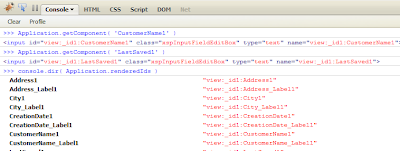
Application.renderedIds
An object containing { designerId: clientId(s) } for all (?) components in the XPage. If there are multiple versions with the same designer id, you'll get the wrong id. (see comments)

Application.getComponent( designerId )
Similar to the getComponent in Server side JS. Fetches the rendered id from Application.renderedIds, then uses the corresponding clientId in a document.getElementById-statement. This method will fail if you try to multiple controls that has the same designerId (repeated items for instance).


Comments/bugreports/wishes are appreciated (but I can't promise anything).

I'm probably going to start working on a big XPage application along with some colleagues in the near future, so it's not impossible that I might turn this into a client side utility component. Time will tell.

>> Demoapp with Custom Control (GetComponentClient)