I got a little fired up by my previous find on using FIELD for declaring global variables in a Page. Therefore I did a little more digging.
FIELD-declared variables does not leak into embedded views, nor do FIELD-declared variables in view selection leak up to the containing page.
FIELD-declared variables leak down to an embedded outline when you display a page in the Notes Client and on the web, HTML style. If you show the embedded outline using a Java Applet, it doesn't work.
FIELD-declared variables in an outline are globally available to the items below the outline item it's declared in (regardless of indentation), in the Notes Client. They are not globally available for web applications, regardless of HTML/Java rendering. E.g. outline item 1 has a FIELD-declared variable -> every outline item after outline item 1 can use it (Notes only).
Showing posts with label formula. Show all posts
Showing posts with label formula. Show all posts
Monday, January 11, 2010


Use FIELD in pages to declare global variables
Edit: It only seems to work when the page is set to Content-Type: Notes, which is a drag (needed it for a custom content-type/JS-page)..
What I've probably longed most for in pages is the ability to have global variables. I thought this was impossible due to the lack of fields in a page.
It turns out it's quite simple. The reason I came up with trying this is Andre Guirards article on Using View Column Programmatic Names. In this article (recommended read!), he discusses the usage of FIELD in view columns/selection formulas to create temporary global variables.
To declare a variable as global, put FIELD in front of it.
Declaration:

Using the variable in a computed text:

Notes:

Web:

What I've probably longed most for in pages is the ability to have global variables. I thought this was impossible due to the lack of fields in a page.
It turns out it's quite simple. The reason I came up with trying this is Andre Guirards article on Using View Column Programmatic Names. In this article (recommended read!), he discusses the usage of FIELD in view columns/selection formulas to create temporary global variables.
To declare a variable as global, put FIELD in front of it.
FIELD globalVariable := "I'm global!";Declaration:

Using the variable in a computed text:

Notes:

Web:

Tuesday, November 17, 2009
Useful formula cheat sheet
Just found this while browsing. Domino Formula @Functions. It's more or less a cheat sheet with @-functions sorted in a logical order.
It's actually made by Lotus, for Notes 6.5. You probably need an A3 printer to transfer it to paper.
Share and enjoy!
It's actually made by Lotus, for Notes 6.5. You probably need an A3 printer to transfer it to paper.
Share and enjoy!
Saturday, December 8, 2007
Readable lookups: Lookups -> HTML with formula
Update, 20.12.07: Demo-application done.
To avoid making a monsterpage, I'll split up the different tricks you can do with the readable lookups technique.
First example, generating HTML from lookups with templating, in a readable way. I'll post a demo-db when I'm done making examples.
First, I create a lookup-view.
First column: firstName + " " + lastName
For real-life apps, I mostly use ComputedWhenComposed-fields with @Unique as a general lookup-field.
Second column:

The advantage in writing it this way is that all you have to do to add more data is to add the field-name to the fields-list. Another advantage is that there is less chance of typing errors, as less is written. The biggest disadvantage is performance. If you have a lot of documents (maybe 20 000++), I'd think the above way of writing the column formula would be more resource-heavy on view-indexing than if you simply concatenate strings.

First, take a look at my previous, less readable technique, where i had pipe-separated lookup-data.
New, "self documenting" lookup -> HTML technique:
Definition lists
A table
>> Result of the above to examples
To avoid making a monsterpage, I'll split up the different tricks you can do with the readable lookups technique.
First example, generating HTML from lookups with templating, in a readable way. I'll post a demo-db when I'm done making examples.
The lookup-view
First, I create a lookup-view.
First column: firstName + " " + lastName
For real-life apps, I mostly use ComputedWhenComposed-fields with @Unique as a general lookup-field.
Second column:
The advantage in writing it this way is that all you have to do to add more data is to add the field-name to the fields-list. Another advantage is that there is less chance of typing errors, as less is written. The biggest disadvantage is performance. If you have a lot of documents (maybe 20 000++), I'd think the above way of writing the column formula would be more resource-heavy on view-indexing than if you simply concatenate strings.
Formula-templating-examples:
First, take a look at my previous, less readable technique, where i had pipe-separated lookup-data.
New, "self documenting" lookup -> HTML technique:
Definition lists
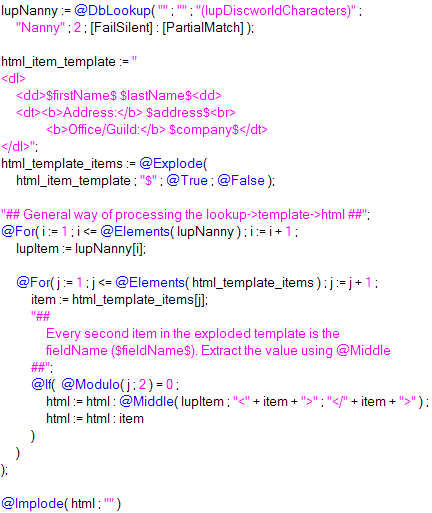
A table
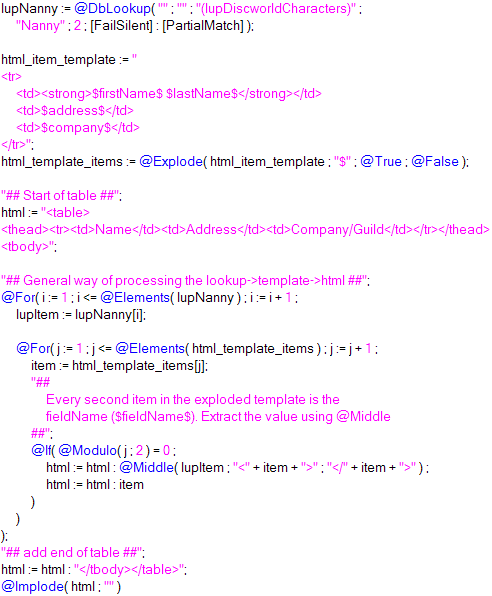
>> Result of the above to examples
Monday, November 19, 2007
Timesaver - Converting several values to text
I've so far only found use for it in lookup-columns, but different people, different needs.
If want to make a pipe-separated lookup-column of values like these: subject(string), ranking(number), previous_ranking(number), posted(date), modified(date)
You can combine values of the same data-type under one @Text like this:
@Implode( subject :
@Text( ranking : previous_ranking ) :
@Text( posted : modified ) ; "|" )
Apart from a timesaver, I also find it easier on the eye, than:
@Implode( subject :
@Text( ranking ) : @Text( previous_ranking ) :
@Text( posted ) : @Text( modified ) ; "|" )
Or, even worse:
subject + "|" +
@Text( ranking ) + "|" + @Text( previous_ranking ) + "|" +
@Text( posted ) + "|" + @Text( modified )
If want to make a pipe-separated lookup-column of values like these: subject(string), ranking(number), previous_ranking(number), posted(date), modified(date)
You can combine values of the same data-type under one @Text like this:
@Implode( subject :
@Text( ranking : previous_ranking ) :
@Text( posted : modified ) ; "|" )
Apart from a timesaver, I also find it easier on the eye, than:
@Implode( subject :
@Text( ranking ) : @Text( previous_ranking ) :
@Text( posted ) : @Text( modified ) ; "|" )
Or, even worse:
subject + "|" +
@Text( ranking ) + "|" + @Text( previous_ranking ) + "|" +
@Text( posted ) + "|" + @Text( modified )
Friday, November 16, 2007
Templating: Lookups -> HTML
Update, 08.12.07: An improved, more readable technique
Inspiration, ExtJs, through Rich Waters.
I've more or less come to the conclusion that HTML in lookup-views is evil.
On one of the apps I work with, there were two access levels, reader, and editor. I used to have a column for each access, and pull HTML from the view.
<pseudocode>
col := @If( @UserRoles = "[Editor]" ; 4 ; 5 );
@Implode( @DbLookup( "" ; "" ; "(lupView)" ; key ; col ; [FailSilent] ) ; "" )
</pseudocode>
This became a headache sometimes. I'd change something in one of the columns to go with new design-desicions. Maybe it was lunch, the end of the day, or talking to a co-worker, not exactly sure, but sometimes only one column remained altered. I'd program javascript/make css for the new HTML, and think everyting is ok. Release the update. Users got JS-errors/corrupted designs/etc.
The errors wouldn't come as far as to applications in production now, as we test thouroughly before release, but it could still be a maintenance headache.
Step one to get rid of headaches:

(missing </table>)
Step two to get rid of headaches:

You're probably not going to save any time writing the transformation to HTML using templates the first time, but you'll save time in the long run. Having the template in one string instead of concatenating bits of the html-per-item on several lines also increases readability of the code.
Example of simple evolution:

Result:

>> Simple demoapp
For my access-level-problem, I either write a separate template for each access (e.g. add edit link for [Editor]),
or put @If(@UserRoles = "[Editor]" ; "" ; @Return("") ) at the top (don't do anything if not editor).
Inspiration, ExtJs, through Rich Waters.
I've more or less come to the conclusion that HTML in lookup-views is evil.
On one of the apps I work with, there were two access levels, reader, and editor. I used to have a column for each access, and pull HTML from the view.
<pseudocode>
col := @If( @UserRoles = "[Editor]" ; 4 ; 5 );
@Implode( @DbLookup( "" ; "" ; "(lupView)" ; key ; col ; [FailSilent] ) ; "" )
</pseudocode>
This became a headache sometimes. I'd change something in one of the columns to go with new design-desicions. Maybe it was lunch, the end of the day, or talking to a co-worker, not exactly sure, but sometimes only one column remained altered. I'd program javascript/make css for the new HTML, and think everyting is ok. Release the update. Users got JS-errors/corrupted designs/etc.
The errors wouldn't come as far as to applications in production now, as we test thouroughly before release, but it could still be a maintenance headache.
Step one to get rid of headaches:
Moving the presentation out of the view
Get rid of HTML-views, use simple lookup-views (value1|value2|value3) instead. Example of transformation to HTML.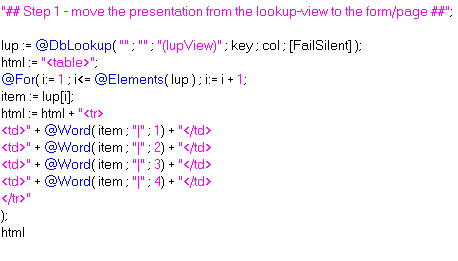
(missing </table>)
Step two to get rid of headaches:
Using template-strings
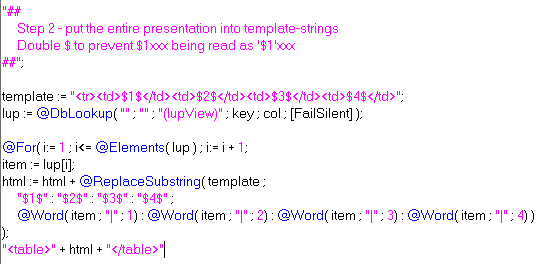
You're probably not going to save any time writing the transformation to HTML using templates the first time, but you'll save time in the long run. Having the template in one string instead of concatenating bits of the html-per-item on several lines also increases readability of the code.
Example of simple evolution:
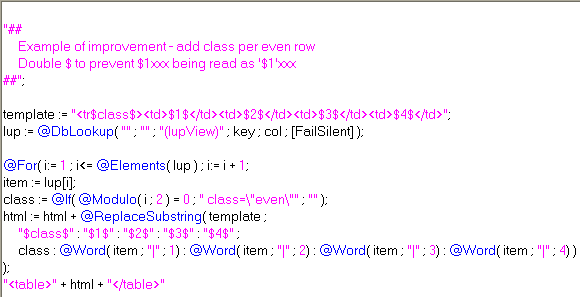
Result:
>> Simple demoapp
For my access-level-problem, I either write a separate template for each access (e.g. add edit link for [Editor]),
or put @If(@UserRoles = "[Editor]" ; "" ; @Return("") ) at the top (don't do anything if not editor).
Monday, October 29, 2007
Generating HTML on WQO with Formula-agents
If you mark a RT-field Pass-Thru HTML (add a space before and after, Text -> Pass-Thru HTML), you can fill it with HTML through formula.

You are limited to ~64k of data per field, and you will have to experiment a little with the generation of the HTML-string (using an array/implode), as Domino tends to give this error-message: HTTP Web Server: Lotus Notes Exception - The formula has exceeded the maximum allowable memory usage.
The advantage with WQO compared to setting the HTML in "Default value"/using a computed text is that you can move the code out of the form (I prefer as little as possible code in the form). You can run multiple agents on WQO if you have several RT-fields you want to fill (menu, maincontent, etc).
When generating HTML, I've been using more and more Evaluates inside LS-WQO-agents. In some cases, where the generated html is less than 64k, formula-agents may be the best "tool".
>> Demo-db with different formula-agents running by @UrlQueryString/a form with two formula WQO-agents.
You are limited to ~64k of data per field, and you will have to experiment a little with the generation of the HTML-string (using an array/implode), as Domino tends to give this error-message: HTTP Web Server: Lotus Notes Exception - The formula has exceeded the maximum allowable memory usage.
The advantage with WQO compared to setting the HTML in "Default value"/using a computed text is that you can move the code out of the form (I prefer as little as possible code in the form). You can run multiple agents on WQO if you have several RT-fields you want to fill (menu, maincontent, etc).
When generating HTML, I've been using more and more Evaluates inside LS-WQO-agents. In some cases, where the generated html is less than 64k, formula-agents may be the best "tool".
>> Demo-db with different formula-agents running by @UrlQueryString/a form with two formula WQO-agents.
Wednesday, October 17, 2007
Keyword/Value lookup fields
I sometimes get a bit frustrated by the lack of associative arrays in the formula language (more specifically in keyword lookup-fields). I’ve thought about ways to emulate this a couple of times, but never got anywhere.
Today, I’ve come up with one way. It’s not beautiful, and one can argue that it’s bad practice.
lupField-syntax:
standard @DbLookup( .. )
Column Value-syntax:
"Error message - keyword-list not found" :
"keyword" : value
"apple" : banana;
Syntax for getting value:
lupField[ @Member( "keyword" ; lupField ) + 1 ]
Error handling
"Advantages":
Disadvantages:
>> Ugly flash-demo
>> Ugly demo-application
If any of you have an even simpler syntax/better concept, please let me know!
Today, I’ve come up with one way. It’s not beautiful, and one can argue that it’s bad practice.
lupField-syntax:
standard @DbLookup( .. )
Column Value-syntax:
"Error message - keyword-list not found" :
"keyword" : value
"apple" : banana;
Syntax for getting value:
lupField[ @Member( "keyword" ; lupField ) + 1 ]
Error handling
- Error message on "keyword value not found" maintained on a column basis.
- First item in the Column Value list should be the error message. Reason being @Member( "itemNotInList" ) = 0 (+1=1)
- "keyword-list not found" maintained in the lookup-field.
"Advantages":
- Put keyword/value wherever you want in the column formula
- Great for design-templates if you want to have configuration-settings in a logical order in the lookup-column (reorder them whenever)
- Print all settings through a simple @For-loop
- Readable
- @Word( settings ; "|" ; 24 )
- versus
- settings[ @Member( "stylesheet" ; settings) + 1 ]
- ..?
Disadvantages:
- Unreadable syntax for people not aware of the technique
- ..?
>> Ugly flash-demo
>> Ugly demo-application
If any of you have an even simpler syntax/better concept, please let me know!
Friday, June 8, 2007
Formula-console in Notes
I really like this one, although it's a really simple one (maybe that's one of the reasons I like it so much).
Call it my Mac Gyver tip of the week (in a french blog, the tip to check the online status of the server with ecblank.gif/onerror-event was called something like that).
I've sometimes got really fed up developing formulas for computed fields, view columns, transforming dblookups, you name it. Just the other day, I thought this one up.
Make a form with an editable input field. Make a hidden SaveOptions-field (computed for display, default value="0").
The editable field is where you type formula-code. The nice thing about notes-fields is that they are multi-line, so you can write quite complicated formulas.
Below the text, write Result: or something like that. Then add a computed text with this formula:
F9 (refresh) to execute the formula.. TaDa! You have your own formula-console.. :)
I have added a toolbar-button in the designer and client, so that I have instant access to the "console".
A little update: If you use a button to @Eval the text-field, you can also execute some UI-formulas, that you can't execute from a computed text.
Call it my Mac Gyver tip of the week (in a french blog, the tip to check the online status of the server with ecblank.gif/onerror-event was called something like that).
I've sometimes got really fed up developing formulas for computed fields, view columns, transforming dblookups, you name it. Just the other day, I thought this one up.
Make a form with an editable input field. Make a hidden SaveOptions-field (computed for display, default value="0").
The editable field is where you type formula-code. The nice thing about notes-fields is that they are multi-line, so you can write quite complicated formulas.
Below the text, write Result: or something like that. Then add a computed text with this formula:
test:=@Eval(inpEval);
@If(@IsError(test);@Text(test);test);
F9 (refresh) to execute the formula.. TaDa! You have your own formula-console.. :)
I have added a toolbar-button in the designer and client, so that I have instant access to the "console".
@Command([Compose];"server": "databaseWithTheForm";"nameOfFormulaConsoleForm")A little update: If you use a button to @Eval the text-field, you can also execute some UI-formulas, that you can't execute from a computed text.