Showing posts with label templating. Show all posts

Wednesday, January 20, 2010

XPages: Three ways to build a search interface with "on the fly" sortable columns

While copy/paste programmers and XPages novices might get something out of this demoapp/blogpost, it's directed towards the people that want to push XPages beyond the constraints of the drag and drop interface in Domino Designer.

I detest the "need" to have a Notes view for every kind view in XPages. Recently, at work, I've been occupied mostly by creating customizable search/filtering views in XPages.

Until today, I've used a DataTable with a SSJS function as data source (returns JS-objects). The function does an FTSearch on a NotesView, and fetch precalculated JSON strings from a view column. The DataTable can be designed to use one/all fields from the json-objects. One DataTable column can have one or more values from the JSON object (e.g. dataItem.fieldName + ' ' + dataItem.fieldName2). This has the advantage of only needing a one (unsorted) column view to generate a wide array of reports.

Julian Buss seems to have been working on/pondering solutions for "on the fly" sortable searches as well. I've implemented what I think he meant in the demoapp as well. I didn't take the time to write caching algorithms for his way, using NotesViewEntryCollection. I also didn't take the time to implement descending sort. The reason I was so lazy was that I didn't like my implementation of his idea.

The last way (default choice in demoapp), and the best way I've found so far is to do FTSearch on the db. In the demoapp, I search the entire db without restricting to a form/etc. This is because I didn't find the need for restricting the search as there are only one kind of documents in the demoapp. The result from the search is a NotesDocumentCollection. The datasource is a function that accepts what I call an array of field definitions.

E.g.
var fieldDefinitons = [{
fieldName: 'someFieldName',
dataType: 'string'
},{
fieldName: 'someFormulaString',
dataType: 'date'
}]


Supported datatypes in the demoapp are string, multi-value string, date, multi-value date, number and multi-value numbers. The field definitions are parsed into a string that can be evaluated against a document (using session.evaluate). Using session.evaluate is the fastest way I know of to get multiple values out of a document. Compared to fetching precalculated JSON strings from a view, there is no discernible difference in speed when evaluating against documents in the NotesDocumentCollection.

Regarding caching, the JSON object is stored in a viewScope-variable. When the user navigates to another page, the JSON object should be recycled from what I understand of XPages/JSF. The values are only fetched from the server when the query string is changed. When the used wants to sort the view, the cached object is resorted. This results in speedy pagination/sort.

On my local computer, with 5000 items in the result-object, re-sort is done in about 100ms on the server. It probably takes 500-1000ms before the user gets what he ordered. The initial search takes 2-4 seconds (server time).

I could probably write a tiny book on the "technology"/thought/history behind this demoapp. Instead, I'll tease you with an animated gif, and let you download a demoapp (here be messy code). The demoapp is a biggie. It's a mutilated version of Jake's FakeNames application. I chose this because I wanted to test against a "big" database. This has 40k NAB Person documents.

Screenshots (animated gif):


>> Demoapp (6 MB zip)

Share and enjoy!

Wednesday, October 7, 2009

Technique: Using a Page as a cross language template/string container

In this demoapp, I use a page as a definition for an XML-representation of a document. It is related to a project at work, where we send XML to a web service. This service is to be called both from the Notes Client, and from an XPage. I could script the XML in both the agent and the XPage, but this could easily develop into a maintenance nightmare.

In the demo, I've used the body of a page as a token string (separated by ¤). The first token is the field-definition. This is to be used in a formula evaluate towards a NotesDocument. The second part is the template itself.
"first_name":"last_name":"company":"address":"age"
¤
<character>
<first_name>[first_name]</first_name>
<last_name>[last_name]</last_name>
<company>[company]</company>
<address>[address]</address>
<age>[age]</age>
</character>

By having the field-definition in the page, you just have to update the page if you want more field values.

I wrote three different script libraries, each having more or less the same functionality. One LotusScript library, one Java (Script) library, and one ServerSide JS library. The libraries contain functionality that extracts the body of the a page based on its name (using a NotesNoteCollection of the pages in the DB).

I also wrote a LS agent, a Java Agent, and a XPage (acting as an agent). Each of them prints XML (based on the template) for the first document in a certain view.


This technique can also be used if you have a big string that is used in code written in multiple languages. If it's Java-code you're writing, and need a big string, this may be an easier way to maintain the string. Another thing that occurs to me is if you generate the same XML/HTML/etc. in multiple databases, you can maintain the String-template in one database, and use Design inheritance to spread it (or get the page from another database using otherDatabase.CreateNoteCollection(false)... )).

As with all techniques, this might not be the right tool for your job. Weigh pros and cons before you decide to use it/not use it.

>> Download DemoApp (open the app in a browser to test the demos)

Comments/critique/bugreports are as always welcome. :)

Friday, March 6, 2009

Taking advantage of JSON from views in XPages

Since we're blessed with pseudo-JavaScript in XPages, it's time to make lookup-views with JSON columns.

If you have a well formed JSON-string, it's extremely simple to convert it to a JavaScript object.

Example:
var jsonString = '{"key":"value", "keyForNumber":2, "keyForArray":["first", "second"]}';
var jsonObject = eval( '(' + jsonString + ')' );

Result:
jsonObject = {
    key: "value",
    keyForNumber: 2,
    keyForArray: ["first", "second"]
}

Instead of making xx amount of views, have a couple of lookup-views. In the XPages, convert the JSON-string from a columnvalue to a JavaScript-object, then pick the values you need.

I've made a little demoapp of how you can take advantage of this with XPages:
>> Download

As I'm addicted to templating, I've made a simple templating-demo as well. Take a look at server side JS.

If you're lazy like me, also take a look at the (JSON\DiscworldCharacter)-view, in the lookup column.

Friday, October 17, 2008

The new templating engine - Preliminary testing

I decided to do some testing of the engine (currently in alpha-stage). At work, I mainly work on content management.

One of our databases has ~5000 (5321) documents (content and categories). They reside in a CMS-type of application.

The current render-engine (using LS/Forall) in the CMS can't deal with that amount of data, when printing the entire structure. After 55 seconds, the rendering stops with no output. Of course, the old engine isn't perfect, and it wasn't built to deal with that amount of data.

When rendering the same markup, with the engine I'm currently working on, it renders in 2.3 seconds, with maximum data being processed in Evaluate (the more data formula can process in a run, the faster it runs). The resulting HTML weighs in at 704KB.

Both tests were done on my 2GHz/2GB RAM laptop.

YAY!

I thought it would be fast, but this is way better than I expected..

If IBM upped the amount of data formula/evaluate could handle, the engine could probably render the structure in just above one second.

Update: Did a little testing in N8.5/XPages (same markup as in the above tests). As other bloggers has mentioned, XPages are fast. What I really don't like about the current version in Beta2 is that you can't control if Dojo is loaded with the page. As far as I know, there is no way to make a regular webpage without client-side JS (Dojo). I hope they fix that in the final version.

Hopefully they implement some kind of dependency-system. It loads what it needs for the widgets you use, then you can decide on the rest yourself (using checkboxes/etc).

Wednesday, October 15, 2008

High performance readable conditional templates

My search for the perfect templating solution for webapps seems to be neverending.

In my latest concoction, I feel I've got a decent mix between readability, speed and flexibility.

Readability


It started out with my feeling that using "readable lookup columns" was a bit to verbose/data-heavy for templating.

I like pipe-separated column values, but on their own, in a template, they can be hard to read.

E.g.
template = "<tr><td>$1</td><td>$2</td></tr>"


What I want to write is something like this:
template = "<tr><td>$name</td><td>$address</td></tr>"


In the demoapp I'm currently working on, I pick the field-labels (e.g. $name) from the first line in the lookup-column (fields := ...) using the Formula-property of NotesColumn.

fields := "firstName" : "lastName" : "company" : "address";
@Implode( @Transform( fields ; "fieldname" ;
@Text( @GetField( fieldname ) ) ) ; "|" )


This way, I don't have to maintain documentation of the indexes of the different values, nor the position of the values.

Performance


To get the most performance out of the rendering-engine, one more or less has to use evaluated formula-code. Iterating over an array of column-values using Forall/Replace is slower. It's more and more noticable the more documents/values one is putting through the rendering engine. If it's slow with one user, it's going to get a lot slower with hundred users/etc.

If all you were rendering were static content, and have a decent caching-engine, performance per render would be less of a problem.

My current solution is to join the array of column-values to a formula-interpretable-list. Due to Evaluate's limit on length of returned data, I have to process the data in snippets.

E.g. LS-array:
array = ["Party","Hard"] '(brackets to indicate an array)
formulaListString = |"| + Join( array, |":"| ) + |"|
'result: "Party":"Hard"


All the templates are "compiled" to @ReplaceSubstring. You can see how I compile/process the templates and data when the demoapp is complete.

Flexibility


Another downside to using pure LS-processing of templates is that it's hard to do conditional templating without slowing down the rendering-engine/writing a lot of code.

Since all data are being processed by Evaluate/Formula, it's quite easy to add conditional compiling as well (@If condition -> conditionalTemplate ). If you want, you can use one template for all the data, or you can have multiple conditions, and a default template.

Example-code/results


Example-code from an agent printing a table from 499 documents

Result - odd/even-template

Result - mixed conditional template

At the bottom of the above HTML-files, you can see the amount of values/rendering-time. The time includes all processing, getting field-indexes, columnvalues, rendering, etc. The processing is done on localhost, on my laptop (Core 2 Duo 2GHz/2GB RAM) in Windows XP.

I'm not done yet with the implementation. The current engine is comprised of two classes. One that renders arrays of pipe-separated values (could also process CSV-files), and a subclass that processes the columnvalues of a view.

I plan to add another subclass to the first. This would let you use ft-search on a view, and sort the resulting columnvalues on a field/value in the resulting columnvalues.

If you have further suggestions/wishes/are curious about the code, contact me. Preferably throught comments. :)

I can't say when the demoapp is complete. I'll probably have another update or two before the app is ready for the masses.

Tuesday, September 23, 2008

Templating: Generating HTML from document collections

Sometimes it can be useful to render HTML from document collections. I believe one of the fastest ways to get values from Notes documents is using Evaluate. As a lazy person, I like to avoid writing formula code, as it's somewhat verbose compared to modern templating languages like PHP.

To avoid this, make your own template interpreter using simple formula code.

Example:
str := "Date: $#dayOfMonth#$. $?month?$.";
'"' + @ReplaceSubstring( str ;
"$?" : "?$" : "$#" : "#$" ;
'" + ' : ' + "' : '" + @Text( ' : ') + "'
) + '"'


Result: "Date: " + @Text( dayOfMonth) + ". " + month + "."

The result can be used in an evaluate statement.

A great thing about templating is that it is very maintainable/reusable. If you want to change the output, all you have to change is the template-string. To generate XML and HTML from the same collection, all you have to do is to have two different string templates. The conversion logic can be the same.

In the simple demoapp I've included, a collection of 300 documents is processed, extracting five fields. A HTML table row is generated per document. class="even"/class="odd" is added so that one can style odd/even rows. If you're somewhat familiar with LotusScript, it should not be hard to make a template-class to fit your needs.

On localhost (my laptop) it takes about 100 milliseconds to generate the HTML/write it to a PassTruHTML NotesRichTextItem.

>> Demoapp

If you want a sorted collection, you can use NotesView.AllEntries, and use NotesViewEntry.Document, to get to the document. Beware of categorized views. Test NotesViewEntry.isValid = True to be certain that the entry represents a NotesDocument. There may be other problems with using NotesViewEntry.Document as well. Proceed with caution/good error handling. :)

Thursday, December 20, 2007

Readable lookups - Demo application

The demo contains:


I've made a simple index-page. If you download the app/open http://domain.com/path/to/demo.nsf, you should see the links to the demos.

The demos aren't very exciting/useable. Take a look at the design elements for the "magic".

The Ajax-demo


Link "To the frontpage" is a part of the above flash-animation

>> Download demo-application

Semi MVC templating

In the templating-demo, I (believe) I've used the MVC pattern for templating/transforming lookups. If anyone knowledgeable about patterns reads this, please let me know if I'm way off on this.

I'm not sure if this is similar to the technique Chris mentioned in a somewhat cryptic comment on another templating blogpost.

I use a naming convention for three kinds of fields. To do the actual transformation, I use a WebQueryOpen-agent.

Naming convention/description


lup_[label]
Model
Computed for display, allow multiple values. These fields fetches the data (using dblookup/-column). One field can be used by multiple templates.

template_[label]_[description]
Controller
Computed for display. These fields contain the description of how the data should be transformed. The label should correspond with the label of a lookup-field. Example of template.

transformed_[label]_[description]
View
Computed for display. These fields will be filled by the result of the transformation. The label/description should correspond the label/description of a template-field.

WebQueryOpen agent
Controller
This agent contains the transformation logic/fills the transformed-fields.

Saturday, December 8, 2007

Readable lookups: Lookups -> HTML with formula

Update, 20.12.07: Demo-application done.

To avoid making a monsterpage, I'll split up the different tricks you can do with the readable lookups technique.

First example, generating HTML from lookups with templating, in a readable way. I'll post a demo-db when I'm done making examples.

The lookup-view


First, I create a lookup-view.

First column: firstName + " " + lastName
For real-life apps, I mostly use ComputedWhenComposed-fields with @Unique as a general lookup-field.

Second column:

The advantage in writing it this way is that all you have to do to add more data is to add the field-name to the fields-list. Another advantage is that there is less chance of typing errors, as less is written. The biggest disadvantage is performance. If you have a lot of documents (maybe 20 000++), I'd think the above way of writing the column formula would be more resource-heavy on view-indexing than if you simply concatenate strings.


Formula-templating-examples:


First, take a look at my previous, less readable technique, where i had pipe-separated lookup-data.

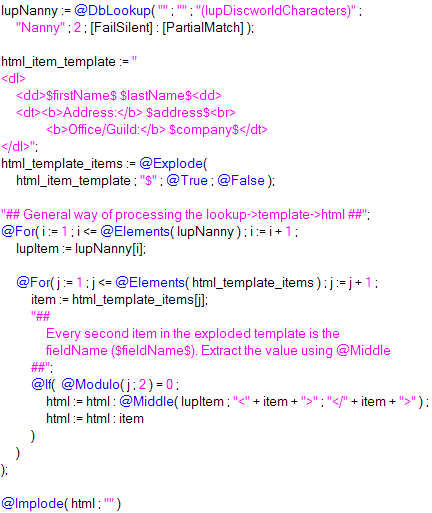
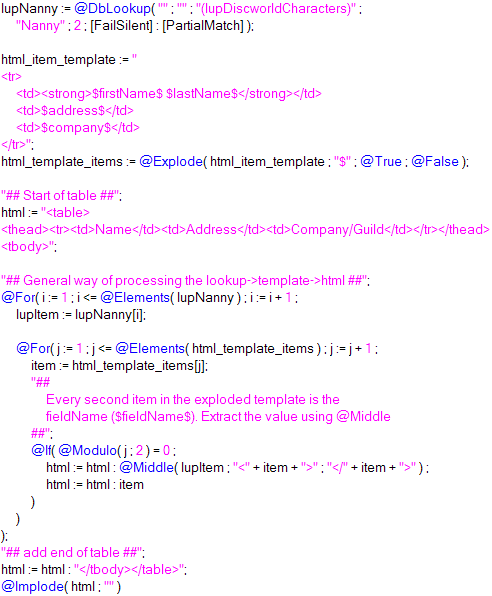
New, "self documenting" lookup -> HTML technique:
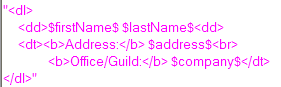
Definition lists
A table

>> Result of the above to examples

Friday, November 16, 2007

Templating: Lookups -> HTML

Update, 08.12.07: An improved, more readable technique

Inspiration, ExtJs, through Rich Waters.

I've more or less come to the conclusion that HTML in lookup-views is evil.

On one of the apps I work with, there were two access levels, reader, and editor. I used to have a column for each access, and pull HTML from the view.

<pseudocode>
col := @If( @UserRoles = "[Editor]" ; 4 ; 5 );
@Implode( @DbLookup( "" ; "" ; "(lupView)" ; key ; col ; [FailSilent] ) ; "" )
</pseudocode>

This became a headache sometimes. I'd change something in one of the columns to go with new design-desicions. Maybe it was lunch, the end of the day, or talking to a co-worker, not exactly sure, but sometimes only one column remained altered. I'd program javascript/make css for the new HTML, and think everyting is ok. Release the update. Users got JS-errors/corrupted designs/etc.

The errors wouldn't come as far as to applications in production now, as we test thouroughly before release, but it could still be a maintenance headache.

Step one to get rid of headaches:

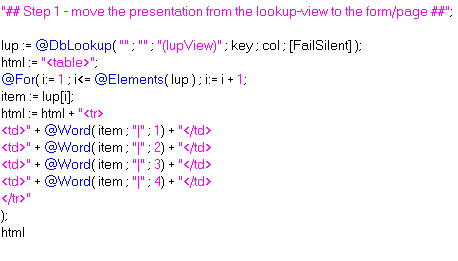
Moving the presentation out of the view

Get rid of HTML-views, use simple lookup-views (value1|value2|value3) instead. Example of transformation to HTML.

(missing </table>)


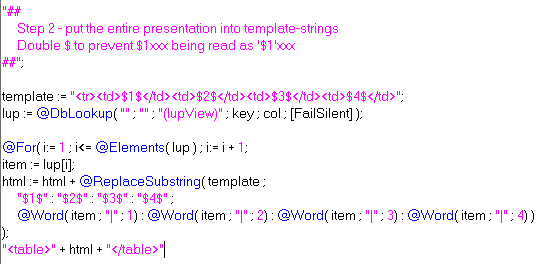
Step two to get rid of headaches:

Using template-strings


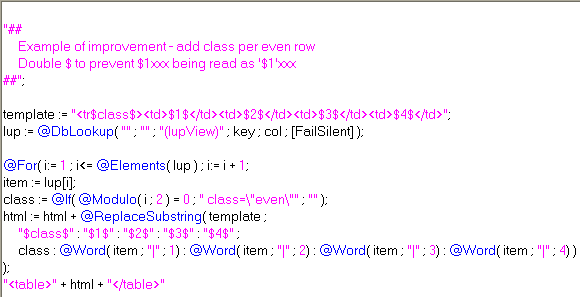
You're probably not going to save any time writing the transformation to HTML using templates the first time, but you'll save time in the long run. Having the template in one string instead of concatenating bits of the html-per-item on several lines also increases readability of the code.

Example of simple evolution:


Result:


>> Simple demoapp

For my access-level-problem, I either write a separate template for each access (e.g. add edit link for [Editor]),
or put @If(@UserRoles = "[Editor]" ; "" ; @Return("") ) at the top (don't do anything if not editor).

Saturday, November 3, 2007

Templating using a NotesForm

Coding templates in an agent leads to very verbose agents/a maintenance nightmare (in my opinion). Coding them in a NotesDocument makes it hard to use them in a Design-template context.

This technique has little verbosity beyond the actual code to generate HTML, and works great in a Design Template-context. It supports modularity, as each field is a potential module. Since the templates are forms, the dynamic "modules" also work in stored documents.

You can combine Java (through LS2J), formula (through Evaluate) and LS , just like you can when you're using agents for templating web-pages. If you're a Java-guy, then you probably would need a little more code (testing field names with Regular Expression) to achieve the same.

Combine this technique with @UrlQueryString in Form Formula if you want the ability to present data in several content-types.

The technique relies on Execute, a WQO-agent and field-names following a pattern. I chose Execute because it's faster than making a testing-routine for patterns. If you're planning on putting this technique to use in real applications, I suggest you use Regular Expressions, Instr, etc. to look for valid field-names, as Execute is horrible to debug.

The demo


I have one pattern that I look for in a field-name, "wqo_actonfield_". The third token (separator = "_") is the method to be executed. The rest of the tokens are ignored to allow several fields executing the same function.

You could also have the rest of the tokens being parameters for the method being executed.

For instance field named "wqo_search_google_dontpanic" -> run a function that inserts HTML with search-results into the field.

>> Demo Application.

Screenshots


WQO-agent for demo:


Form, one demoBody-field:


Result, web


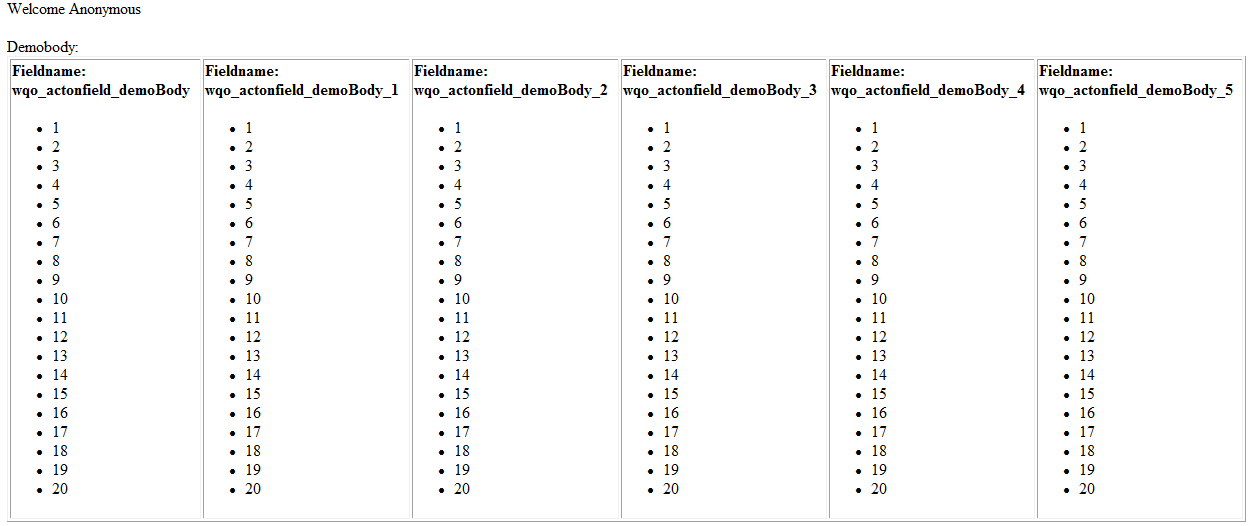
Form, six demoBody-fields:


Result, web (click for full size)


As always, comments are appreciated :)

Monday, October 1, 2007

Rewriting the renderer to Java

Continuing my templating-experiment in Domino.

I'm doing this for two reasons, to brush up on my Java-skills (or lack thereof), and to make the templating syntax simpler (using the power of Regular Expressions).

Evaluating formulas are possible.

LotusScripts blocks not possible directly. You could write LS-statements to a field in a document, run a LS-agent that Executes the string, and prints the result in the same field. Open the document again in Java, and fill in the result, but I think that would be very hard to debug.

I hope to use this syntax (please give input if and why this is bad):
%moduleName% <- a module
$fieldName <- reference a field, wherever in the template
<@ .. @> <- formula block

Formula-blocks makes it possible to do stuff like:
<html>
<head><title>UFO Sightings</title></head>
<body>
<@
    @If( @UserRoles = "[Editor]" ; "" ; @Return("<h1 style=\"color:red\">Access denied</h1>") );

    lup := @DbLookup( "" ; "" ; "(lupTopSecret)" ; "ufo" );

    "<h1>UFO Sightings</h1><ul>" +
    @Implode( "<li>" + lup + "</li>" ; "" ) + "</ul>"
@>
</body>
</html>

This would be a standalone web-page, not a template referencing data from a stored document.

The above example is of course possible to do with a Form or a Page.

I'll see how long my interest in this experiment last. Hopefully I can make a demo that is hard to do with existing technology.

For instance,
..
<div id="nav">%menu%</div>
<div id="content">
<xmlTransform src="http://webpage.com/view?ReadViewEntries"
    xslt="http://webpage.com/fancyTable.xsl" />

</div>
..

Sunday, September 30, 2007

PHP-like Templating in Domino

Templating may sound confusing, since "we" have Design Templates, but I believe that is what Ruby On Rails/PHP-guys call this.

Vision:
Imagine you get a XML-spec your customer want data exported in. With my method, you may just be able to copy/paste the spec into a template-document. Add field references, and you are good to go.

The same with HTML-pages. Make a static mock-up in Aptana/DreamWeaver. Paste it into your template (maybe split it into modules), add field-references, and you have a nice-loking, valid (if that's what you're aiming for) dynamic (X)HTML-page.

To make/edit the documents, you can use the notes-generated form.

The demo
I've been wanting to do this for a while, but other experiments have overshadowed this. Thanks to this post by Michel Van Der Meiren, and a couple of beers this weekend, I finally got around to making a prototype.

Since I'm lazy, I don't take the time to make data. I use the FakeNames database, kindly provided by Jake.

I think making the templates took me about an hour, including finding out the names of the fields I was going to use. Rapid deployment..

Document in it's original form:


Simple table with header-module:


>> HTML Template source

XML:


>> XML Template source

Text:

>> Text Template source

Implementation:

Getting the correct content-type
To show the documents in a template, I have a view that opens the Person-documents in a form that has the correct content-type (Form Formula). In the demo, I look for Text or XML in the @UrlQueryString( "template" ). If XML, XML-form, text, Text form, else HTML-form. On WebQueryOpen, I run the agent that applies the template to the document. It prints its output to a NotesRichTextItem.

The template-query string decides which template to show the document in.

Processing the template
I first split UnformattedText of the body-field in the template on #%, which are used to process modules, if there are any. Example of module-reference, #%header#%.

I test each item in the resulting array, item Like "*[A-Z,a-z]". This simple testing-method should work for HTML/XML, because they containt a lot of has brackets, which are not Like A-Z. With text-templates, there may occur errors using this. For more complex content, you could make a LS2J-class that enables you to do Regular Expression tests of the content.

The reason I check for modules first, is that they can contain formula-snippets and field-references, which also should be processed.

In it's current state, it doesn't support modules within modules.

Then I look for field references, which are contained within #$, e.g. #$FirstName#$.

Finally, I look for formula-snippets, e.g. #@WebDbName#@, in the home-link of the simple table template, and pointing to a stylesheet in the application.

>> Demo application

If you're downloading the demoapp


All design-elements made for the demo have DontPanic as a comment. I cleaned out a lot of the original design-elements in the app, to make it easier to find what I made for the demo.

The agent that "renders" documents is called "RenderPage". It's not well commented, but I hope most of the code speaks for itself.

Open the db on the Web, click on one of the people to open the document in its original form.

At the top of the page, there is a button for each template I made for the demo.


All the templates are in the templates-view, modules (only one in the demo) in the modules-view.

Why should I care/You can already do this with a form+content-type HTML


If you add more advanced back-end processing, you could have inline LS/Function calls in the context of the document. e.g.
#LS
Use "MenuBuilder"
makeMenu( #@UserRoles#@ )
#LS
^^This using Execute.

I don't think you need to pass the document-object to the inline functions, since NotesSession.DocumentContext is a global object. From a little test, it seems like it's best to Update the RT-field before running each inline LS-modification to it.

Inline formula-example

#F
@For( i:=0 ; i<10 ; i := i++;
    num := @Text(i);
    html := html + "<tr><td>" + @GetField( "line" + num) + "</td></tr>"
)
"<table>" + html + "</table>"
#F

You can of course do this with a a regular form using a WQO agent + computed elements, but what I hope my proposal of "Notes Templating" can do, is to add a layer of abstraction, maybe to make it easier for notes newbies to make Domino Webapps.

I also think this way is more readable than a lot of computed text/Computed For Display fields. The downside is that it adds processing overhead.

Comments/suggestions are greatly appreciated!