Showing posts with label lotusscript. Show all posts

Friday, January 18, 2013

Small LS class that can be used to check if fields have changed

We've had some issues with semaphore locks on one of our import databases. The import database has routines that import/update data, then replicate it to a cluster when it's done.

We're not exactly sure what triggers the locks, but the server crashed sometimes several times a day, so we decided to see if the import routines could be optimized to do as few writes as possible.

Several of the routines saved documents even if there were no field changes. I wrote a simple class to test for field value changes.
'// Used to test if certain fields have changed
Class FieldChangeChecker
 Private fieldsToCheck As Variant
 Private fieldValues List As Variant
 
 '// Run this after calculcation/etc. to see if specified fields have changed
 Function haveFieldsChanged( doc As NotesDocument ) As Boolean
  On Error GoTo bubbleError
  
  If doc.isNewNote Then
   haveFieldsChanged = True
   Exit Function
  End If
  
  Dim initialValue As Variant, currentValue As Variant
  ForAll fieldName In Me.fieldsToCheck
   initialValue = Me.fieldValues( fieldName )
   currentValue = doc.getItemValue( fieldName )(0)
   
   If initialValue <> currentValue Then
    haveFieldsChanged = True
    Exit Function
   End If
  End ForAll
  
  Exit Function
bubbleError:
  Error Err, errorMessage()
 End Function
 
 '// Comma separate field names. E.g. "forename,surname"
 Sub New( ByVal commaSeparatedFieldNames As String )
  On Error GoTo bubbleError
  
  Me.fieldsToCheck = FullTrim( Split( commaSeparatedFieldNames, "," ) )
  
  Exit Sub
bubbleError:
  Error Err, errorMessage()
 End Sub
 
 
 '// Run this before calculation/etc.
 Sub readInitialValues( doc As NotesDocument )
  On Error GoTo bubbleError
  
  ForAll fieldName In Me.fieldsToCheck
   Me.fieldValues( fieldName ) = doc.getItemValue( fieldName )(0)
  End ForAll

  Exit Sub
bubbleError:
  Error Err, errorMessage()
 End Sub 
End Class
Example of use:
..
Dim fieldChangeChecker As New FieldChangeChecker( "FirstName,LastName,Address,PostCode,City" )
Set customerDoc = customersView.getFirstDocument()
While Not customerDoc Is Nothing
 Call fieldChangeChecker.readInitialValues( customerDoc )

 '// Code that looks up the newest information and sets fields

 If fieldChangeChecker.haveFieldsChanged( customerDoc ) Then
  Call dataDoc.Save(True, False) 
 End If

 Set customerDoc = customersView.getNextDocument( customerDoc )
Wend
..
Regarding the errorMessage-function in the class. I use error bubbling in all my LS code. If something fails somewhere in a routine, I want the routine to stop executing. At the top of the stack, I use OpenLog/LogError. This gives me a nice pseudo stack of the function calls.
Code for errorMessage function:
Function errorMessage As String
 '// Simple function to generate more readable errors when dealing with error-bubbling
 Dim message As String
 message = Error
 
 If CStr( GetThreadInfo(10) ) = "INITIALIZE" Then
  errorMessage =  "Error " & Err & " on line " & Erl & " in function " & GetThreadInfo( 10 ) & ": " + Error
 Else
  errorMessage =  Chr(13) + Chr(9) + "Error " & Err & " on line " & Erl & " in function " & GetThreadInfo( 10 ) & ": " + Error$ 
 End If 
End Function

Monday, May 16, 2011

Force embedded views to open on the same server as the app containing them

I've been doing some Notes development lately. I've noticed that the embedded views are being loaded from the server where the app that have the embedded views was opened last. I wrote a little procedure that you can run on PostOpen in database script.

Input parameter: the name(s) of the forms with external embedded views.

The code inspects the DXL of the form and fetches all the replicaids of the external embedded views. It then tries to open these databases and add them to the workspace with the server the user is currently on. As far as I've tested, it seems to work as described. Let me know if there are bugs.

Sub loadEmbeddedViewsOnCurrentServer( formsWithEmbedded As Variant )
On Error GoTo bubbleError
'// Goes through the form(s) specified by name in formsWithEmbedded and opens the dbs
'// that have the embedded views on the same server as the code is running
If DataType( formsWithEmbedded ) = 8 Then
formsWithEmbedded = Split( formsWithEmbedded, "¤¤¤" )
End If

Dim s As New NotesSession, db As NotesDatabase, currentServer As String
Set db = s.currentDatabase
currentServer = db.server

'// Find forms
Dim noteCol As NotesNoteCollection
Set noteCol = db.createNoteCollection( False )
noteCol.selectForms = True
noteCol.selectionFormula = |$title="| + Join( formsWithEmbedded, |":"| ) + |"|
Call noteCol.buildCollection()

Dim formNoteId As String, formDoc As NotesDocument
Dim dxlExporter As NotesDXLExporter, dxlStream As NotesStream
Dim embeddedPosition As String, embeddedView As String
Dim formDxl As String, embeddedViews As Variant, replicaid As String
Dim workspace As New NotesUIWorkspace(), embeddedViewDb As NotesDatabase
Dim openedDbs As Variant, result As Variant

openedDbs = Split( "" )
Set dxlStream = s.createStream()

formNoteId = noteCol.getFirstNoteId()
While formNoteId <> ""
Set formDoc = db.getDocumentById( formNoteId )

'// Extract DXL from form
Set dxlExporter = s.createDxlExporter( formDoc, dxlStream )
Call dxlExporter.process()

dxlStream.position = 0
formDxl = dxlStream.readText

'// Get embedded view info
embeddedPosition = InStr( formDxl, "<embeddedview" )
While embeddedPosition > 0
'// Embedded views can be defined as <embeddedview /> or <embeddedview></embeddedview> - try both
embeddedView = StrLeftBack( StrRightBack( formDxl, "<embeddedview" ), "</embeddedview>" )
If embeddedView = "" Then embeddedView = StrLeftBack( StrRightBack( formDxl, "<embeddedview" ), "/>" )

'// Open databases
If InStr( embeddedView, "database" ) > 0 Then
replicaid = Strtoken( StrRightBack( embeddedview, "database='" ), "'", 1 )
If replicaid <> "" Then
'// If db hasn't been opened before in the script - open
If IsNull( ArrayGetIndex( openedDbs, replicaid ) ) Then
Set embeddedViewDb = New NotesDatabase( "", "" )
Call embeddedViewDb.openByReplicaId( currentServer, replicaid )
If Not embeddedViewDb Is Nothing Then
If embeddedViewDb.isOpen Then
Call workspace.addDatabase( currentServer, embeddedViewDb.filePath )
End If
End If

openedDbs = ArrayAppend( openedDbs, replicaid )
End If
End If
End If

'// Remove start tag for the processed embedded view - only run once per embedded
formDxl = Replace( formDxl, "<embeddedview" + embeddedView, "" )

'// Find next embedded view
embeddedPosition = InStr( formDxl, "<embeddedview" )
Wend

Call dxlStream.truncate()
formNoteId = noteCol.getNextNoteId( formNoteId )
Wend

Exit Sub
bubbleError:
Error Err, Error
End Sub

Monday, January 31, 2011

LS: Currency data type seems to return proper results in arithmetics

I had a problem the other day with JS' inaccurate arithmetics. One can also stumble onto the same problem with LS:
Dim first As Double, sec As Double, third As Double
first = 0.1
sec = 0.2
third = 0.3

Print ( first + sec ) = third
'// -> False

I got a little bit curious, and lurked around in the documentation for other number data types in LS. Lo and behold, there's Currency. It seems to have some inbuilt functionality that corrects the inaccuracy in data types like Double.
Dim first As Currency, sec As Currency, third As Currency
first = 0.1
sec = 0.2
third = 0.3

Print ( first + sec ) = third
'// -> True
Nice to know if you need accurate results when doing arithmetics in LS.

Friday, October 29, 2010

LotusScript: Fast sorting of arrays using Java

If you want to sort large string arrays (>1000 items), LotusScript can be horrendously slow. Back in the day, I tried to use Java via LS2J. Unfortunately LS2J was so unstable that I went back to pure LS sorting.

The reason I'm so interested in efficiently sorting arrays, is that I use a token string array as a base when rendering various content in a CMS I maintain at work. Sorting big arrays in LS is, as said, slow. Sorting token string arrays, based on a specific token in LS is s l o w!

Then came Domino 8.5.2, and NotesAgent.runWithDocumentContext :D

Basically, it lets you send an in-memory NotesDocument to an agent (LS or Java), and modify it.

To the demoapp..

In the demoapp, I've created a couple of helpers that lets you sort arrays with the Java API (via a Java Agent). It supports (locale aware) sorting of "regular" string arrays, and token string arrays, based on a token

With 5-600 items in the array, Java beats LS, even when sorting by token. The more items, the bigger the difference.

With 10 000 items, running on my computer:
Java sort: 0.9 seconds
LS Sort (algorithm): 46 seconds
Java token sort: 1.5 seconds

Open the demoapp on the web to run the test on your system. Modify the (SortDemo) agent to test different array sizes.

>> Download DemoApp (demoapp is around 6MB, due to 40k+ documents)

Share and enjoy!

Wednesday, October 7, 2009

Technique: Using a Page as a cross language template/string container

In this demoapp, I use a page as a definition for an XML-representation of a document. It is related to a project at work, where we send XML to a web service. This service is to be called both from the Notes Client, and from an XPage. I could script the XML in both the agent and the XPage, but this could easily develop into a maintenance nightmare.

In the demo, I've used the body of a page as a token string (separated by ¤). The first token is the field-definition. This is to be used in a formula evaluate towards a NotesDocument. The second part is the template itself.
"first_name":"last_name":"company":"address":"age"
¤
<character>
<first_name>[first_name]</first_name>
<last_name>[last_name]</last_name>
<company>[company]</company>
<address>[address]</address>
<age>[age]</age>
</character>

By having the field-definition in the page, you just have to update the page if you want more field values.

I wrote three different script libraries, each having more or less the same functionality. One LotusScript library, one Java (Script) library, and one ServerSide JS library. The libraries contain functionality that extracts the body of the a page based on its name (using a NotesNoteCollection of the pages in the DB).

I also wrote a LS agent, a Java Agent, and a XPage (acting as an agent). Each of them prints XML (based on the template) for the first document in a certain view.


This technique can also be used if you have a big string that is used in code written in multiple languages. If it's Java-code you're writing, and need a big string, this may be an easier way to maintain the string. Another thing that occurs to me is if you generate the same XML/HTML/etc. in multiple databases, you can maintain the String-template in one database, and use Design inheritance to spread it (or get the page from another database using otherDatabase.CreateNoteCollection(false)... )).

As with all techniques, this might not be the right tool for your job. Weigh pros and cons before you decide to use it/not use it.

>> Download DemoApp (open the app in a browser to test the demos)

Comments/critique/bugreports are as always welcome. :)

Tuesday, May 26, 2009

Conclusive way of testing if content has changed since last FTIndex

The standard way of testing, db.LastModified > db.LastFTIndexed, works great in a production environment. When you're doing performance tuning of an application that updates it's FT-index, it's not so great.

NotesDatabase.LastModified also includes changes to design elements. If you use the above test to fire a NotesDatabase.UpdateFTIndex, then the check, db.LastModified > db.LastFTIndexed, will return true until a document is modified in the db/the FTIndex is updated. Changes to design elements is ignored by the FT-indexing service on the server.

NotesDatabase.UpdateFTIndex is relatively expensive (I would think the more documents in the database -> The more time to check if the FTIndex should be updated). In an application of mine, I use NotesView.FTSearch to find certain content in views (to create HTML menu, etc). I use a class that updates the FT-index before it does the search. On regular pages, there is created two instances of this class. In an application with 200 documents, it takes the server ~130ms to do two calls to NotesDatabase.UpdateFTIndex, when the application is indexed. When I do performance tuning, I do changes to design elements, not content. Therefore the aforementioned test to determine if content has changed is flawed.

This is my so far best alternative to the "standard check". It takes 16ms to do twice in the aforementioned application. A savings of ~115ms.

Function contentChangedSinceLastFTIndex( db As NotesDatabase ) As Boolean
Dim session As New NotesSession

Dim lastFTIndexed As Variant
lastFTIndexed = db.LastFTIndexed

'First test (least resource-hungry)
If Not ( db.LastModified > lastFTIndexed ) Then
contentChangedSinceLastFTIndex = False
Exit Function
End If

'Conclusive test - test if actual documents (not design elements)
'have been changed since last FTIndex
Dim dateFTIndexed As New NotesDateTime ( lastFTIndexed )

Dim col As NotesDocumentCollection
Set col = db.GetModifiedDocuments( dateFTIndexed )
If col.Count > 0 Then contentChangedSinceLastFTIndex = True
End Function

Friday, May 8, 2009

LotusScript: Case insensitive replace

Recently, I've been working on "cloning" CMS-type applications. To avoid a lot of unnecessary work, I run an agent on the copied CMS that rewrites the UNID of the documents to that of the document in the original CMS, and rewrites local links to point to the cloned application.

Since the urls can be typed in multiple ways, the way to go for the link rewriting is case insensitive replace. This is provided in LotusScript (no need for Java).
Replace( htmlBody, webDbNameSource, webDbNameClone, , , 1 )

The last parameter tells replace that it should do a case insensitive replace.

All the parameters (taken from the documentation)
0 (default): case sensitive, pitch sensitive
1: case insensitive, pitch sensitive
4: case sensitive, pitch insensitive
5: case insensitive, pitch insensitive

Example of pitch difference: e, é, è

The CMS applications in question are web applications, so the body is text/HTML. If you're working on cross platform (Notes/Web) applications, I'd think there would be more work to clone an app (RT-navigation *shudders*).

Wednesday, January 7, 2009

Useful new LS-method in Notes 8.5 - NotesDocumentCollection.StampAllMulti

Input parameter, NotesDocument. Add the values you want to stamp the collection with as fields in a (temporary) NotesDocument.

E.g.
Dim s As New NotesSession
Dim doc As New NotesDocument( s.CurrentDatabase )
Call doc.replaceItemValue( "field1", "1" )
Call doc.replaceItemValue( "field2", "2" )

'col is a NotesDocumentCollection
Call col.StampAllMulti( doc )

Thursday, October 9, 2008

ArrayAppend accepts single values

From the documentation, it looks like you need two arrays to use ArrayAppend. In Notes 8.02, at least, you can also use this function to add single values at the end of a dynamic array (arrays created using Split, NotesItemValues, etc).

Dim i As Integer, numberlist As Variant
numberList = Split( 1 )
For i = 2 To 20
numberList = Arrayappend( numberlist, i )
Next
Print Join( numberList, ", " )
'Prints 1, 2, 3, 4, 5, 6, 7, 8, 9, 10, 11, 12, 13, 14, 15, 16, 17, 18, 19, 20

It seems to work in the same way as Array.push in Javascript for adding single values to an array, and Array.concat for combining two arrays.

Update: To do the equivalent of Array.unshift in Javascript (add a value to the start of an array), it seems you need to split the value (the first parameter has to be an array).

Dim arr As Variant, i As Integer
arr = Split( 20 )
i = 20
While i > 0
i = i - 1
arr = Arrayappend( Split( i ), arr )
Wend

Print Join( arr, ", " )
'Prints 0, 1, 2, 3, 4, 5, 6, 7, 8, 9, 10, 11, 12, 13, 14, 15, 16, 17, 18, 19, 20


I would think there would be a performance hit when dealing with a lot of values, but at least it's possible.

If IBM would just give us the Eclipse Java editor inside DDE, I could finally stop dealing with the crappy array-implementation in LS.

What would be even better was if IBM teamed up with Aptana for editing server-side Javascript agents/script libraries.. Throw in E4X for dealing with XML.. One can always dream.. :D

Thursday, September 25, 2008

The HttpRequest class updated - Get cookie values

I've updated the HTTPRequest-class so that you also can use it to pick cookies of a request.

Example code:

Dim request As New HttpRequest()
Dim sessionCookie As String
sessionCookie = request.cookie( "DomAuthSessId" )
Print "I've got your cookie!"


Although I link to Jake's excellent demonstration of how simple it is to get the session cookie, I wrote the cookie-bit a couple of days before, in work relation.

>> HttpRequest Source code

Tuesday, January 29, 2008

Readers-/Authors field one liner

While doing som googling today I discovered that NotesDocument.ReplaceItemValue returns NotesItem. The reason I haven't discovered this before is probably because I've been lazy, and used the "dot" notation.

What I was googling for was actually advantages of using Get-/ReplaceItemValue versus the dot-notation. I've mostly used those two methods in loops, when the dot-notation would be horrid and evil to use (the copy-paste-then-edit-index-method). My quest recently is to create readable code, so I'll try using getters/replacers ( :| ) over dot-notation, and see how I feel about that.

To the point of this post.. I discovered the return value in a comment to Andre Guirard's blogpost/article, GetItemValue and ReplaceItemValue vs. "dot-notation".

Since Get-/ReplaceItemValue returns a NotesItem, you can write:doc.ReplaceItemValue( "read_access",_
"Arthur Dent/Earth" ).IsReaders = True

doc.ReplaceItemValue( "write_access",_
"Ford Prefect/Megadodo Publications" ).IsAuthors = True


I'm not totally confident with the readability of the above. A little more readable approach (?):Dim readAccessItem As NotesItem
Set readAccessItem = doc.ReplaceItemValue(_
"read_access","Arthur Dent/Earth" )
readAccessItem.IsReaders = True

Dim writeAccessItem As NotesItem
Set writeAccessItem = doc.ReplaceItemValue(_
"write_access", "Ford Prefect/Megadodo Publications" )
writeAccessItem.IsAuthors = True


Maybe none of the above is easy to read to people unfamiliar with ReplaceItemValue, but the Lotus Notes LotusScript API doesn't always make it easy to write readable code. I wish all chainable methods were as readable as this:Call session.currentDatabase.allDocuments.removeAll()

Wednesday, January 23, 2008

A thing to be aware of when creating FT-index with LotusScript

The agent must run locally. This is achieved by [agent].RunOnServer.

This is probably public knowledge.

A thing I just discovered is that the database you're creating the index for has to contain at least one document. I stumbled onto this when working with an agent that creates a "history" database (empty on creation) from a template.

Another application copies documents into the history DB when changes are made. The history DB has a search interface, and therefore I create the the FT-index.

It's a simple workaround, create a dummy-document, create ft-index, delete dummy-document, but WHY should I have to do that?!?

Tuesday, November 27, 2007

Maintaining Strong Typing in LotusScript

Update 28.11.07: Tim Tripcony wrote a somewhat related article about using ByVal for input parameters. Recommended read!

--

Upon reading "Code Complete", I discovered that a way of using Subs I've previously thought of as bad practice, actually is quite normal.

The author writes (I apologize if I interpreted this wrong) that some developers think that functions should be used for mathematical calculations/simple operations and procedures used for more advanced stuff. In LotusScript, from his description, a Sub is a procedure and a Function is a function (duh..).

He also suggest that when you make procedures, you put input parameters (read) first , and output-parameters (modify) second, to make it easier to read the code.


One of the advantages with using subs this way is that you can always maintain strong typing. This enables you to capture coding-errors at compile-time, instead of at runtime.

In the code below:
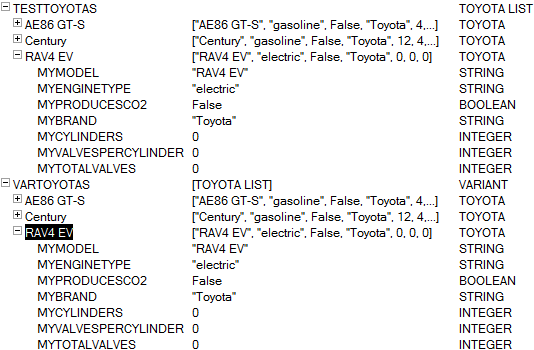
createToyotas is a sub that has an outputparameter, List As Toyota
toyotas is a function that returns a variant containing List As Toyota


The compiler recognizes that a "Toyota" doesn't have a method "destroyWorld", whereas the variant, also a Toyota, passes through compiling.

Error caught at compile-time with strong typing, whereas the variant doesn't cause an error until runtime.

In most cases you could probably pinpoint the runtime-error quite fast, but catching it at compile-time is preferrable for me at least.

Also, the most common error would probably be a spelling-mistake, not trying to run a random thought-up method.

Performance-wise, there may also be advantages, especially if you're using inheritance/creating many objects/etc.

When debugging there doesn't seem to be much advantage using strong typing over variants.

>> Extremely simple db with some (messy)test-code (test-agent, StrongTypingAdvantage)

If you can think of other advantages, or disadvantages for that matter, please post a comment!

Sunday, October 14, 2007

Redim performance

Out of curiosity/"challenge" from Julian, I did a little test of ReDim performance.

I'm not that familiar with redimming arrays, so someone let me know if this way of testing is bad.

Result:

Code:


Percentwise, the difference is humongous, but in seconds, not that big of a difference.

>> Code as text

Thursday, October 11, 2007

Thinking outside the box, String Concatenation

If you're looking for the ultimate concatenation-tool:
Using Julians StringBuffer: 0.25s
Using NotesStream: 0.6s
Using NotesRichTextItem: 1.6s

==

A little while ago, I posted that NotesRichTextItem.AppendText is FAST.

On the train today home from work, I got an idea... Why not use a temporary NotesRichTextItem for string concatenation.

With 100.000 string concatenations, string = string + fourLetterString took about 140 seconds.

With NRTI.AT, it was finished in 1.6 seconds.. Read that again.. 100.000 concatenations in 1.6 seconds!

Simply do NRTI.GetUnformattedText to extract the concatenated string after you're done.

Code:

Result:


>> Download code

Sunday, August 12, 2007

Fun stuff with the FieldListener class

BIIG flash.. Sorry, but don't know how to get it smaller.


In the demo above, I have a form with a "Microsoft Web Browser" object. If the "search" field contains the words wiki, amazon or amazonuk, I use the searchengine at the site to search for the rest of the parameters.

The search-sub:

Sub search
Dim ws As New NotesUIWorkspace
Dim arrAction As Variant
Dim sstr As String, baseURL As String

arrAction = Split(ws.CurrentDocument.FieldGetText( "search" ), " ")


Dim browser As Variant
Set browser = ws.CurrentDocument.GetObject("Microsoft Web Browser")
If browser.width <> 950 Then
browser.width = 950
browser.height = 700
End If

sstr = Replace( Implode(arrAction, "+"), arrAction(0)+"+", "")
Select Case Lcase( arrAction(0) )
Case "wiki"
baseURL = "http://en.wikipedia.org/wiki/Special:Search?search="

Case "amazonuk"
baseURL = "http://www.amazon.co.uk/s/026-5318277-1707602?&field-keywords="

Case "amazon"
baseURL = "http://www.amazon.com/s/026-5318277-1707602?&field-keywords="

Case Else
baseURL = arrAction(0)
sstr = ""
End Select

Call browser.navigate( baseurl + sstr )
End Sub

Saturday, August 11, 2007

FieldListener class for NotesUI - search on enter, etc.

To redeem myself from my previous SNTT post, I did a little brainstorming, to find something worthy for SNTT. I hope this one is..

A while back Chris Blatnick posted a method to listen for 'Enter', and search based on JavaScript in the Notes client.

Lotus did a bad implementation of setInterval in the Notes client (several actions by the user can cause the interval to run "forever" -> high CPU usage). Because of that, the method is probably not an option for most people.

The FieldListener class I made for this demo, uses the NotesTimer, and On Event Alarm to do the same. Since you're working with LS, you can add whatever functionality you want in response to something the user writes.

The downside with NotesTimer is that you can only specify whole seconds (Integer) as the intervals. Worst-case scenario, there is a delay of one second between a phrase being typed and the action execution.

Demo (the button calls the same method as the fieldListener, onEnter):


To implement the FieldListener-object on a form:
Globals in the form:

Option Public
Use "FieldListener"


Declarations:

Dim fieldListenerObject As FieldListener


In the QueryOpen event:

Sub Queryopen(Source As Notesuidocument, Mode As Integer,_
Isnewdoc As Variant, Continue As Variant)
Dim interval As Integer
interval = 1
Set fieldListenerObject = New FieldListener( Source, "fieldName",_
"substring(Chr(10) without quotes=enter)", interval, "actionToExecute" )
End Sub


I'm running two paralell "listeners" on one field in the demo, one for "johnny", and one for Chr(10) (Enter).

Download the application to see the implementation of the demo. Johnny can speak, but my screen capture software (free) cannot listen (there is a setting for it, but it doesn't work on my machine).

Friday, August 10, 2007

Strange bug(?) - Pass Me as a parameter works...sometimes

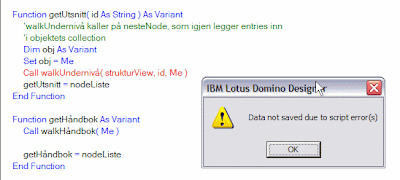
When I try to pass Me (As Variant) into a method that takes one parameter (getHåndbok in the pic), it works, when I try to pass Me into a sub that takes three parameters(getUtsnitt in the pic), this happens:
Error

I have to create a variant and assign Me to it to make it work (replace Me with obj). Bug?

The Subs being called:


Wednesday, August 8, 2007

Dynamic LS-methods - Allow fluid number of/types of parameters

The easier / better way, use Lists... :)

Thanks Dwight and Sean.


My example is quite simple, but with some data-type testing/object testing and decent error-handling, I think you could expand this "idea" into more advanced Subs/Functions.

Instead of setting the method to accept a fixed amount of parameters, set it to accept one object. In my example, I use a Class that allows you to add different objects (through a variant-array).

There is (at least) one weakness with this approach. You can't add arrays to the Argument-object, as (from what I've read) an array can't contain another array. If it's a string array, you could implode the array, add a symbol at the front of the string to identify it as an array, and split it in the receiving function.

Screenshots of test-agent:
Dim s As New NotesSession
Dim args As New Arguments

Dim doc As NotesDocument
Set doc = s.CurrentDatabase.CreateDocument
doc.subject = "Some mostly harmless planet"

Call args.add( "Tommy Valand" )
Call argumentsAsObject( args )


Call args.add( doc )
Call argumentsAsObject( args )


Call args.add( "Always pack your towel!" )
Call argumentsAsObject( args )


The Arguments-class
The argumentsAsObject-sub
The test-agent
Code in a text-file

The Arguments class:

'argsdemo scriptlib
Class Arguments
Private counter As Integer
Private args() As Variant

Public Sub add( var As Variant)
Redim Preserve args( counter )
If Isobject ( var ) Then
Set args( counter ) = var
Else
args( counter ) = var
End If

counter = counter + 1
End Sub

Public Function getNth( nth As Integer ) As Variant

If Isobject ( args(nth) ) Then
Set getNth = args(nth)
Else
getNth = args(nth)
End If
End Function

Public Function getAll As Variant
getAll = args
End Function

Public Function length As Integer
length = Ubound( args ) + 1
End Function
End Class


Sub that take one parameter (As Arguments):

'accept an Arguments-object
Sub argumentsAsObject( args As Arguments )
Select Case args.length
Case 1
Msgbox "Name: " + args.getNth(0)

Case 2
Msgbox "Name: " + args.getNth(0) + Chr(13) +_
"Address: " + args.getNth(1).subject(0)

Case Else
Dim strTemp As String
Dim counter As Integer
Forall item In args.getAll
'35 - Product object (I know it's a NotesDocument)
If Datatype( item ) = 35 Then
strTemp = strTemp + "Item at index " +_
Cstr( counter ) + ": doc[" + item.subject(0) + "]" + Chr(13)
Else
strTemp = strTemp + "Item at index " +_
Cstr( counter ) + ": " + item + Chr(13)
End If

counter = counter + 1
End Forall
Msgbox strTemp
End Select
End Sub


Full code for the test-agent:

'options
Option Public
Option Declare
Use "argsdemo"

Sub Initialize
Dim s As New NotesSession
Dim args As New Arguments

Dim doc As NotesDocument
Set doc = s.CurrentDatabase.CreateDocument
doc.subject = "Some mostly harmless planet"

Call args.add( "Tommy Valand" )
Call argumentsAsObject( args )

Call args.add( doc )
Call argumentsAsObject( args )

Call args.add( "Always pack your towel!" )
Call argumentsAsObject( args )
End Sub


If you have an easier way to allow this kind of flexibility please let me know.

Friday, July 27, 2007

Working around the 64k print limit in web-agents

In LS, there seems to be a 64k limit per Print statement

If you have agents that print a large amount of HTML/XML (concatenating into a string), one workaround is to check the string-length frequently:

If Len(yourString) > safeNumber Then
Print yourString
yourString = ""
End If

Where yourString is the string containing the HTML/XML/etc., and safeNumber is a number that is smaller than the 64k - the maximum amount of characters you can imagine is added per concatenation.

If there is A LOT (5000+) of string concatenation in the agent, I suggest using Julian Robichaux' StringBuffer class. You would have to add a getLength-method, to check the length of the buffer.

Something like this:

'in stringbuffer class
Public Function getLength() As Long
getLength = Len(buffer)
End Function

'in the printing agent
If bufferObject.getLength > safeNumber Then
Print bufferObject.toString()
bufferObject.erase()
End If


The above If-statements .. > safeNumber .. should be put inside the loop that you use to concatenate the string. Thanks for making me aware of the bad "documentation", Thomas.


If you have a lot of different content you want to print, I'd suggest having one agent per content-type, and that the agents only contains method calls to their respective script libraries (which in turn can use other scriptlibs). Having 20+ agents in an application quickly gets messy (at least from my point of view).

Example:
..xml?OpenAgent&action=report&type=wages&employeenum=2134212

In agent (untested code):

Use "PrintXML"
Dim s As New NotesSession
Dim action As Variant

action = Evaluate( |@UrlQueryString("action")|,_
s.DocumentContext)
'the evaluate above returns a text-list with one item
Select Case( action(0) )
Case "report"
Call report( s.DocumentContext )
End Select