Showing posts with label sntt. Show all posts

Friday, November 21, 2008

Avoid save-conflicts in web applications

I had a problem with save-conflicts today.

In an app I work with, the users can modify the category a document belongs to from the document-editing interface. When the category is saved, all documents that belong to the category are updated with new paths.

Sometimes, when a user saved the document after modifying the category, a save-conflict would occur (I couldn't recreate the save conflict in Firefox for some reason, only IE).

I searched the forums for help, and found it (thanks, Erik C. Brooks). If you remove the %%ModDate front-end with Javascript, you avoid save-conflicts. I tested it, and it seems to work. To be somewhat on the safe side, I only remove the field when a category is being modified from the document-editing interface.

Simple code to remove the field:
var f = document.forms[0];
f.removeChild( f['%%ModDate'] );

Friday, September 19, 2008

Processing documents by category in categorized views

Problem: How to process documents in a category (categorized view) in a simple way?

This is a problem I've heard a couple of times at work from the Notes-guys (I'm a Domino/Web-guy). I've tried a couple of approaches/googled, but found nothing. Therefore I archived this problem in my "experiment ideas"-folder.

Today I had a little time to play around, and found a very simple solution.

When you click an item in a view, a couple of properties is set in the NotesUIView. CaretNodeId points to the NoteId of the document that is selected. The gem is that when you click a category, an "invalid" NoteId is set. If you can't get a document from from the db using that NoteId, the item clicked is probably a category.

Now you know the user clicked a category.

Combining the ViewSelection-formula of the view, and the Formula-property of the first column (the column has to point to one field in the document for this to work), you have a valid search-formula for db.search.

Now you know which documents the user want.

Of course, the user don't want to modify documents by category each time they click the category. Add a button that sets an environment variable, and test for the value of that variable in the onSelect-event in the view. If you want to make available several types of action on the documents, use more values.

Now you know when/how the user wants to modify the documents

Problem solved..? :)

As always, blogposts like this are useless without a simple demoapp..
>> DemoApp

If you like/dislike this workaround/hack, please leave a comment.

Update: The onselect event is new in Notes 8. So if you're running on older versions, I guess there's no simple solution. Thanks to Theo for giving me a heads up!

Wednesday, September 17, 2008

Json-search on Domino views

Domino (at least pre 8.5) doesn't let you use $$SearchTemplate forms as anything other than vanilla Domino-generated html forms.

This makes it somewhat difficult to search/getting Json-data in return.

The simplest workaround I've found is to make a view with one column. The data is formatted as Json, with a trailing comma. In the search-template, I wrap the $$ViewBody-field like this:
<div id="result">[|$$ViewBody-field|,""]</div>

When I want to search, I use a temporary iframe, added to the DOM using Javascript. To make it as simple as possible, browser compatibility-wise (events), I add a the iframe inside a temporary div using innerHTML. The iframe has an onload-event. When that triggers, I know that the Json is loaded.

I'm terrible at explaining code (terrible at explaining anything), so I've made a simple demo-app you can try. Remember to create a full-text index on the demo-db before trying it out.

Flash demonstration of the app (I parse the Json to HTML):


>> Demoapp

The app is tested, and works in Opera 9.5, FF3 and IE7 on Vista x64.

Wednesday, September 10, 2008

Fun with the WebBrowserControl - DemoApp release

I think I've cleaned up the demo-app good enough now.

I added another demo, showing the browser on the onHelp event in Notes/offline Mootools accordion.

Apart from that, I've changed the way I store JS. I now store it in a page, and use the NotesNoteCollection of the db to fetch it (look in the code). This makes it easier to implement in a Template-context.

If you test the app on something else than Notes 8, I'd appreciate feedback (preferably in the comments) on the stability of the demoapp.

To test out making friends, edit a document in the DiscworldCharacters-view (make sure the HTTP-task is running). If you're running the demo on a server, edit the Add friend-button, so that the domain is correct.

The other demos are in the BrowserDemo-form.

>> The WebBrowserControl demoapp

The flash-demos are here

Update: Martin tested the app in N6.53. That makes it at least compatible with N6.5 to N8.02.

Thursday, January 31, 2008

No more coding PassThruHTML for RT-fields

Update, 04.02.08: It seems ReplaceItemValue on NotesRichtextItems is limited to dreadful 64k limit. Undocumented as far as I can tell.

When storing HTML in documents, I've always done the .RemoveItem .. CreateStyle .. PassThruHTML .. CreateItem... body.AppendStyle ..body.AppendText..

It can be simpler (WebQuerySave):
Dim session As New NotesSession
Dim doc As NotesDocument
Set doc = session.DocumentContext

Dim body As NotesRichTextItem
Set body = doc.GetFirstItem( "body" )
Call doc.ReplaceItemValue( "body", body.GetUnformattedText() )
Call doc.Save( False, False )


Where "body" is the name of you RichText-field.

The RichText-fields needs to be marked as PassThruHTML in the form. The easiest way to do this is to add a space before and after. Select space[RichText]space. Text -> Pass-Thru HTML.

This turned out to be a great day of discovery for me :D

Simple demo-db to test the difference between saving the document with above code on WQS/no WQS.

--
(Original post, Flush NotesRichTextItem on one line)

In the past, I haven't found another way to flush content in a RTI than to remove the existing, and create a new one.

I did a little testing today, and found out you can use ReplaceItemValue to flush the content:
Call [NotesDocument].ReplaceItemValue( "[RT-fieldname]", "")

If you want to replace the content, with something else from a String:
Call [NotesDocument].ReplaceItemValue( "[RT-fieldname]", newContentString)


Leaner code.. Yay!!

Friday, January 11, 2008

Taking visual control of Domino generated views

This is somewhat related to my previous post, as that is what sprung this idea forward, adding a class-attribute per even row/colgroup-nodes per column, dynamically.

In the downloadable demo application, I've made a $$ViewTemplateDefault-form with a JS-function that does the above, onload.

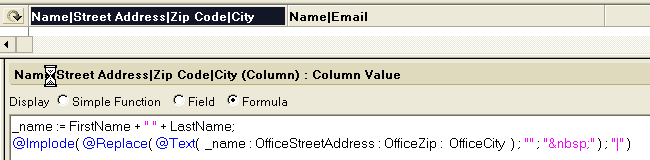
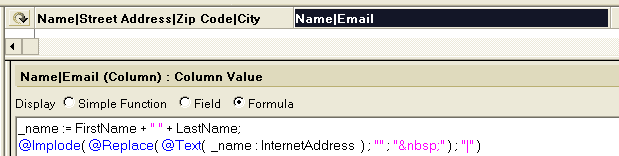
Every even row has class="even". The generated colgroup is structured like this, a <colgroup> containing <col id="column[number]"/> nodes, where [number] corresponds to the column number it represents.

To get a fix on the Domino-generated table, I've added a span around an embedded view (to easier control count). id="domino_view", class="@ViewTitle[1]".

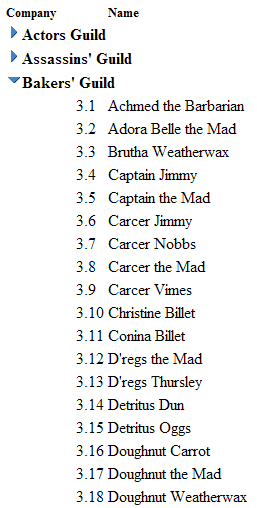
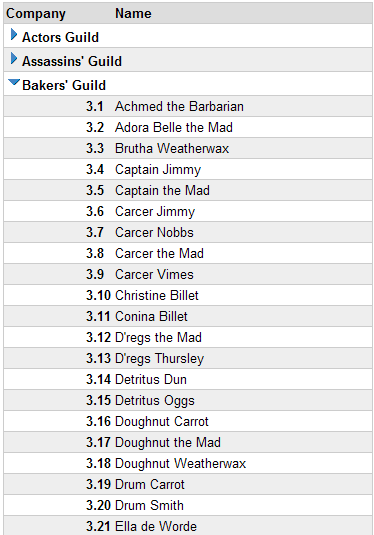
I don't know what more to say than take a look at the screenshots, and download the app, look at the code/css if you think it's something you can use.

Some screenshots


Categorized view, no CSS
Categorized view, styled

Flat view, no CSS
Flat view, styled

>> The demo application

Tested in IE 6/7, FF2 and Opera 9.

If you discover bugs/find something strange in the demo-app/etc, let me know. Preferably through comments.. :)

Thursday, December 20, 2007

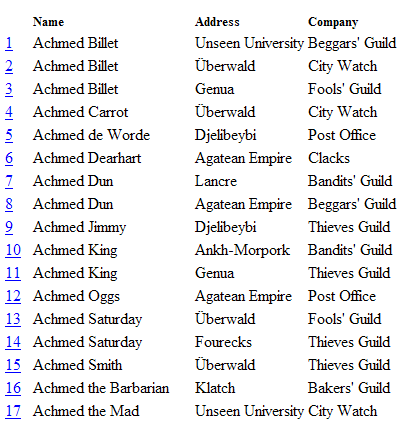
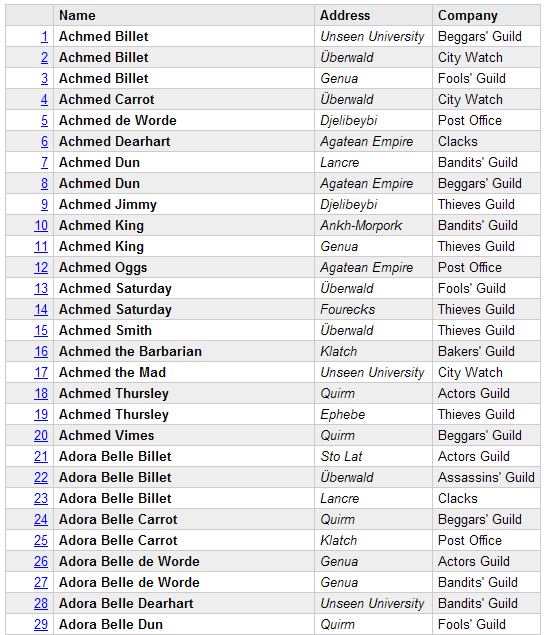
Readable lookups - Demo application

The demo contains:


I've made a simple index-page. If you download the app/open http://domain.com/path/to/demo.nsf, you should see the links to the demos.

The demos aren't very exciting/useable. Take a look at the design elements for the "magic".

The Ajax-demo


Link "To the frontpage" is a part of the above flash-animation

>> Download demo-application

Wednesday, December 12, 2007

Debugging: Inspect what's being posted from a form

Sometimes I make parts of a form using PassThruHTML/hidden notes-fields. Mostly because Domino-generated HTML is hard to style (especially radio-buttons/checkboxes). This sometimes work immediately, and sometimes it takes hours to make it work. I've found it a great help to see what is being posted to the server.

There are HTTP-sniffer applications that you can inspect the request with, but I find it easier to post the form to an agent, and then print the request-content as a HTML-table.

Example of output, Jake's FakeNames database, Person-form with a couple of fields filled in.

It's also handy to "echo" get-requests when developing agents: A simple ?OpenAgent

In the demo-application for this blogpost, I've made a (javascript) action-button that rewrites the action-field in the form to point to an agent. The agent tries to print every field in NotesSession.DocumentContext.

To make this work in your applications, (hopefully,) you only have to copy the Script Library, InspectRequest, the agent inspectrequest, and the shared action, Inspect current form-values. Insert the shared action into the form you want to test.

To inspect DocumentContext in other agents, use docToHTML in the Script Library, InspectRequest. As a rare occurence, I've actually documented this function.

To get the current field-values, I trigger the equivalent of @Command( [ViewRefreshFields] ), using the Domino _doClick function.

>> Download demo application

Friday, November 16, 2007

Templating: Lookups -> HTML

Update, 08.12.07: An improved, more readable technique

Inspiration, ExtJs, through Rich Waters.

I've more or less come to the conclusion that HTML in lookup-views is evil.

On one of the apps I work with, there were two access levels, reader, and editor. I used to have a column for each access, and pull HTML from the view.

<pseudocode>
col := @If( @UserRoles = "[Editor]" ; 4 ; 5 );
@Implode( @DbLookup( "" ; "" ; "(lupView)" ; key ; col ; [FailSilent] ) ; "" )
</pseudocode>

This became a headache sometimes. I'd change something in one of the columns to go with new design-desicions. Maybe it was lunch, the end of the day, or talking to a co-worker, not exactly sure, but sometimes only one column remained altered. I'd program javascript/make css for the new HTML, and think everyting is ok. Release the update. Users got JS-errors/corrupted designs/etc.

The errors wouldn't come as far as to applications in production now, as we test thouroughly before release, but it could still be a maintenance headache.

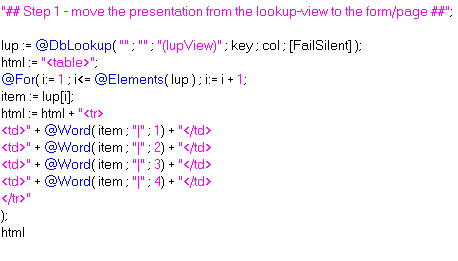
Step one to get rid of headaches:

Moving the presentation out of the view

Get rid of HTML-views, use simple lookup-views (value1|value2|value3) instead. Example of transformation to HTML.

(missing </table>)


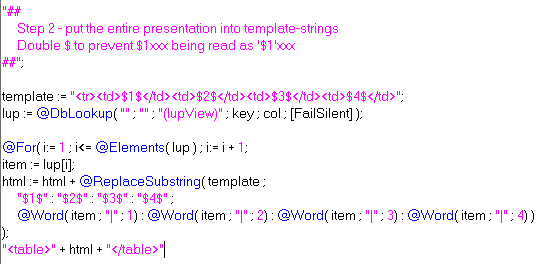
Step two to get rid of headaches:

Using template-strings


You're probably not going to save any time writing the transformation to HTML using templates the first time, but you'll save time in the long run. Having the template in one string instead of concatenating bits of the html-per-item on several lines also increases readability of the code.

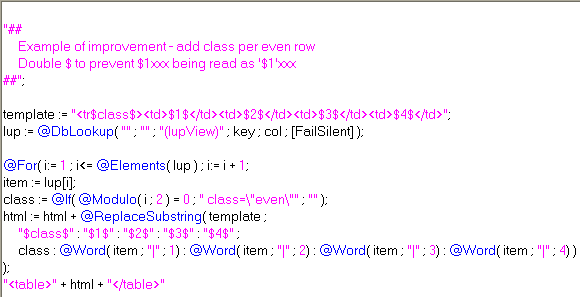
Example of simple evolution:


Result:


>> Simple demoapp

For my access-level-problem, I either write a separate template for each access (e.g. add edit link for [Editor]),
or put @If(@UserRoles = "[Editor]" ; "" ; @Return("") ) at the top (don't do anything if not editor).

Saturday, November 3, 2007

Templating using a NotesForm

Coding templates in an agent leads to very verbose agents/a maintenance nightmare (in my opinion). Coding them in a NotesDocument makes it hard to use them in a Design-template context.

This technique has little verbosity beyond the actual code to generate HTML, and works great in a Design Template-context. It supports modularity, as each field is a potential module. Since the templates are forms, the dynamic "modules" also work in stored documents.

You can combine Java (through LS2J), formula (through Evaluate) and LS , just like you can when you're using agents for templating web-pages. If you're a Java-guy, then you probably would need a little more code (testing field names with Regular Expression) to achieve the same.

Combine this technique with @UrlQueryString in Form Formula if you want the ability to present data in several content-types.

The technique relies on Execute, a WQO-agent and field-names following a pattern. I chose Execute because it's faster than making a testing-routine for patterns. If you're planning on putting this technique to use in real applications, I suggest you use Regular Expressions, Instr, etc. to look for valid field-names, as Execute is horrible to debug.

The demo


I have one pattern that I look for in a field-name, "wqo_actonfield_". The third token (separator = "_") is the method to be executed. The rest of the tokens are ignored to allow several fields executing the same function.

You could also have the rest of the tokens being parameters for the method being executed.

For instance field named "wqo_search_google_dontpanic" -> run a function that inserts HTML with search-results into the field.

>> Demo Application.

Screenshots


WQO-agent for demo:


Form, one demoBody-field:


Result, web


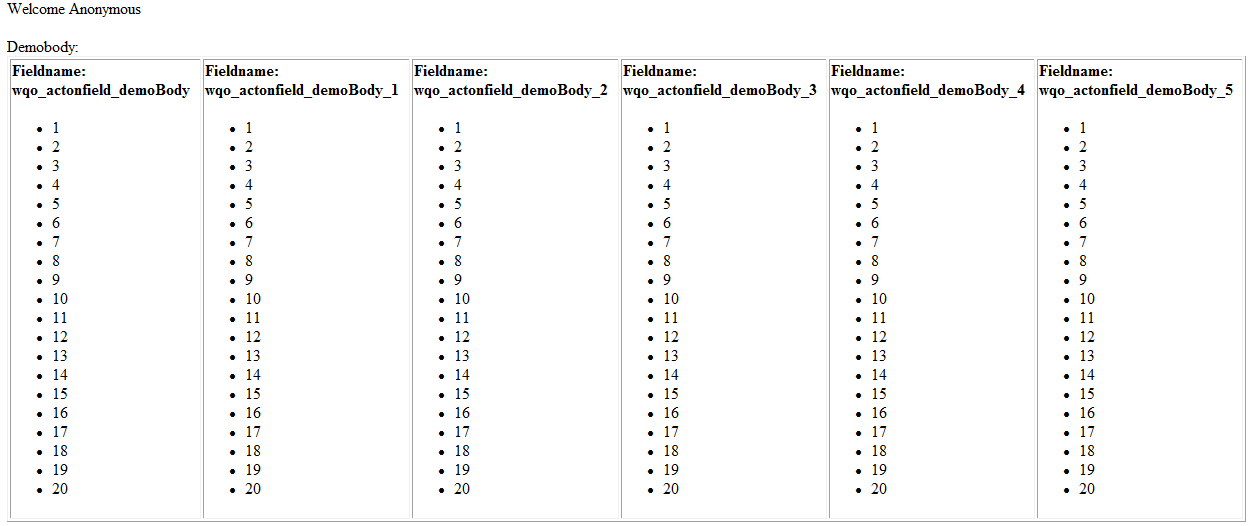
Form, six demoBody-fields:


Result, web (click for full size)


As always, comments are appreciated :)

Wednesday, October 17, 2007

Keyword/Value lookup fields

I sometimes get a bit frustrated by the lack of associative arrays in the formula language (more specifically in keyword lookup-fields). I’ve thought about ways to emulate this a couple of times, but never got anywhere.

Today, I’ve come up with one way. It’s not beautiful, and one can argue that it’s bad practice.

lupField-syntax:
standard @DbLookup( .. )

Column Value-syntax:
"Error message - keyword-list not found" :
"keyword" : value
"apple" : banana;

Syntax for getting value:
lupField[ @Member( "keyword" ; lupField ) + 1 ]

Error handling
  • Error message on "keyword value not found" maintained on a column basis.
  • First item in the Column Value list should be the error message. Reason being @Member( "itemNotInList" ) = 0 (+1=1)
  • "keyword-list not found" maintained in the lookup-field.

"Advantages":
  • Put keyword/value wherever you want in the column formula
    • Great for design-templates if you want to have configuration-settings in a logical order in the lookup-column (reorder them whenever)
  • Print all settings through a simple @For-loop
  • Readable
    • @Word( settings ; "|" ; 24 )
    • versus
    • settings[ @Member( "stylesheet" ; settings) + 1 ]
  • ..?

Disadvantages:
  • Unreadable syntax for people not aware of the technique
  • ..?

>> Ugly flash-demo
>> Ugly demo-application

If any of you have an even simpler syntax/better concept, please let me know!

Thursday, October 11, 2007

Thinking outside the box, String Concatenation

If you're looking for the ultimate concatenation-tool:
Using Julians StringBuffer: 0.25s
Using NotesStream: 0.6s
Using NotesRichTextItem: 1.6s

==

A little while ago, I posted that NotesRichTextItem.AppendText is FAST.

On the train today home from work, I got an idea... Why not use a temporary NotesRichTextItem for string concatenation.

With 100.000 string concatenations, string = string + fourLetterString took about 140 seconds.

With NRTI.AT, it was finished in 1.6 seconds.. Read that again.. 100.000 concatenations in 1.6 seconds!

Simply do NRTI.GetUnformattedText to extract the concatenated string after you're done.

Code:

Result:


>> Download code

Tuesday, October 9, 2007

Complex transforms

I think there is a assumption amongst Notes/Domino developers that you can only have @If inside @Transform (I blame the documentation). This is wrong.

If you put a @Do inside the @Transform, you can have "as many lines as you want". Variables created inside the @Transform is reachable from outside the transform.

To document this, I've made an ugly example :)

Result:


Code:


>> Download formula

Wednesday, October 3, 2007

Click-to-sort "view" in one column

In this SNTT, I try to demonstrate some of the power of @Sort and Evaluate.

The demo I've made transforms a column containing pipe-separated values to a HTML table with click-to sort (Ascending/Descending) column headers, using a form with a WebQueryOpen-agent.

>> Flash demo

In the flash-demo, performance may seem a little low. The demo is running locally. I tested the form+agent in another application on a Domino-server, to see if it was as general as I wanted, and there, performance was a lot better. It took me about a minute or two to make a click-to-sort view in the other application, which I'm quite happy about.

Domino has click-to-sort columns in views, but I've never tested it on the web. The strength of this way of doing it is that you have the power over the HTML.

There are 20k+ documents in the demo-application, but the agent that generates the click-to-sort tables can only handle 100-1000 rows of data. I couldn't find a corrolation between the amount of data, and max number of rows. I tested a two-column table and a four column table, and I got more rows out of the four column one.

At the top of the MakeSortableTable-agent, there is a parameter (maxrows) that controls the max amount of rows to show in the view.

--

>> Demo Application

If you want to add this functionality to an application of yours, simply copy the form and agent in the demo into your application, make the "lookupview", in the same way I made my People-view. Column title should contain the table header titles (separated by "|") for the columns, column value should contain the column values for the table (also separated by "|")

Column1 in the People-view


Column2

Sunday, September 30, 2007

PHP-like Templating in Domino

Templating may sound confusing, since "we" have Design Templates, but I believe that is what Ruby On Rails/PHP-guys call this.

Vision:
Imagine you get a XML-spec your customer want data exported in. With my method, you may just be able to copy/paste the spec into a template-document. Add field references, and you are good to go.

The same with HTML-pages. Make a static mock-up in Aptana/DreamWeaver. Paste it into your template (maybe split it into modules), add field-references, and you have a nice-loking, valid (if that's what you're aiming for) dynamic (X)HTML-page.

To make/edit the documents, you can use the notes-generated form.

The demo
I've been wanting to do this for a while, but other experiments have overshadowed this. Thanks to this post by Michel Van Der Meiren, and a couple of beers this weekend, I finally got around to making a prototype.

Since I'm lazy, I don't take the time to make data. I use the FakeNames database, kindly provided by Jake.

I think making the templates took me about an hour, including finding out the names of the fields I was going to use. Rapid deployment..

Document in it's original form:


Simple table with header-module:


>> HTML Template source

XML:


>> XML Template source

Text:

>> Text Template source

Implementation:

Getting the correct content-type
To show the documents in a template, I have a view that opens the Person-documents in a form that has the correct content-type (Form Formula). In the demo, I look for Text or XML in the @UrlQueryString( "template" ). If XML, XML-form, text, Text form, else HTML-form. On WebQueryOpen, I run the agent that applies the template to the document. It prints its output to a NotesRichTextItem.

The template-query string decides which template to show the document in.

Processing the template
I first split UnformattedText of the body-field in the template on #%, which are used to process modules, if there are any. Example of module-reference, #%header#%.

I test each item in the resulting array, item Like "*[A-Z,a-z]". This simple testing-method should work for HTML/XML, because they containt a lot of has brackets, which are not Like A-Z. With text-templates, there may occur errors using this. For more complex content, you could make a LS2J-class that enables you to do Regular Expression tests of the content.

The reason I check for modules first, is that they can contain formula-snippets and field-references, which also should be processed.

In it's current state, it doesn't support modules within modules.

Then I look for field references, which are contained within #$, e.g. #$FirstName#$.

Finally, I look for formula-snippets, e.g. #@WebDbName#@, in the home-link of the simple table template, and pointing to a stylesheet in the application.

>> Demo application

If you're downloading the demoapp


All design-elements made for the demo have DontPanic as a comment. I cleaned out a lot of the original design-elements in the app, to make it easier to find what I made for the demo.

The agent that "renders" documents is called "RenderPage". It's not well commented, but I hope most of the code speaks for itself.

Open the db on the Web, click on one of the people to open the document in its original form.

At the top of the page, there is a button for each template I made for the demo.


All the templates are in the templates-view, modules (only one in the demo) in the modules-view.

Why should I care/You can already do this with a form+content-type HTML


If you add more advanced back-end processing, you could have inline LS/Function calls in the context of the document. e.g.
#LS
Use "MenuBuilder"
makeMenu( #@UserRoles#@ )
#LS
^^This using Execute.

I don't think you need to pass the document-object to the inline functions, since NotesSession.DocumentContext is a global object. From a little test, it seems like it's best to Update the RT-field before running each inline LS-modification to it.

Inline formula-example

#F
@For( i:=0 ; i<10 ; i := i++;
    num := @Text(i);
    html := html + "<tr><td>" + @GetField( "line" + num) + "</td></tr>"
)
"<table>" + html + "</table>"
#F

You can of course do this with a a regular form using a WQO agent + computed elements, but what I hope my proposal of "Notes Templating" can do, is to add a layer of abstraction, maybe to make it easier for notes newbies to make Domino Webapps.

I also think this way is more readable than a lot of computed text/Computed For Display fields. The downside is that it adds processing overhead.

Comments/suggestions are greatly appreciated!

Friday, September 7, 2007

Introducing NotesFX 0.1 Alpha

If you're coming to this post directly, NotesFX 0.2, which is stable here.

When I made the BlindDown demo, I thought that was the best I could do with layers in the client. Just the other day, I did a little pondering, and now I've found out how to animate size and position (sliding) in two dimensions, use/switch images from image-resources with one JS-command (and slide them in two dimensions), all contained in one(!!) subform :)

>> View demo

>> Download Demo Application

Setting borders on layers was one of the possible limitations I feared, but thanks to my good friend, "Google Search", I found this gem by Jane Griscti.

The biggest problem with the current version of NotesFX is that it seems to crash the JS-engine in the Notes Client. When this error occurs (after running 5-6 demos), you have to KillNotes.exe/start Notes again to run more demos, since Notes doesn't seem to have trash management for JS in the client.

I'm planning to look at acceleration in movement/size, and see what I can do with that in an upcoming version. Not sure when/if it is possible to have these effects without getting memory leaks (which is what I think occurs).

If you're downloading/running the demoapp:

You're going to have to kill Notes!! (the JS-engine crashes)


The demo-form is named "DemoAnimation". Open it in the Client, and click the different actions to see demos of effects.

The JS is really messy, but if I find a way to do effects, and not overload Notes, I may clean up the code, and document usage of the JS "classes".

Real-life usage (if/when stable/usable):
If someone is only saving/not closing the window, slide in message, "Document has been saved.", slide out.
Maybe small blind-up/down-effects combined with hide-whens on forms.
Popping in please-wait images before running something heavy.

Tuesday, September 4, 2007

BlindDown-effect in the Notes Client using JavaScript

If you find this interesting, take a look at my "NotesFX", which has more effects.

I don't know if this could be considered a hack. It's probably not useful (at least not in this state), but still fun.

The BlindDown-effect is found in DHTML-libraries like Scriptaculous and Mootools. Scriptaculous demo-page


>>Download demo-application

To achieve this effect, I have a layer with a table inside. In the table, I have three computed fields. One of them contains the title of the "help message", one contains the message, and one is used to add line-breaks into (-> what looks like animation). The "line-break" field has a font-size of 3, so that the animation looks somewhat smoothly, but is not too slow.

I have a javascript-function that takes the delay between each line-break, number of line-breaks (iterations), message title, and title. The iteration-parameter is put into a global variable that decrements for each added line-break.

I use setTimeout to call the same function until iterations=0.

The messages is put into a javascript-object with arrays corresponding the parameters that should be passed to the "blind down" function. This to make it easier to maintain the messages.

I use Notes' (or rather JavaScript 1.3's) apply-method to apply the array to the blind-down function.

Each field's onFocus code:
blindDownMessage.apply( "", messages[this.name])

Example of the messages-object:
var messages = {
name: [ 10, 10, "Your name", "Here you fill inn your name.\n\nE.g. Donald Duck, Dillbert, etc." ]
}


If you're downloading the demo:
The demo-form is named "BlindDown". Open it in the Client to test the demo.

You could also put more advanced things in the layer.

Hide the cell-content initially. After the "animation" is finished, set the value to make the cell visible, click a refresh-button (hide it with a layer/etc), using javascript. E.g. document.forms.nameOfButton.click()

I haven't tested the above suggestion, so I don't know if it's possible to do in a usable way.

Wednesday, August 29, 2007

Ajax-like live-search in the client

This one was harder than I initially had hoped, and it is still just a proof of concept at best.


>> Download Demo Application

I built this demo on top of Jake's Fake Names application. The "autocomplete" performs a DbLookup based on the value of the field the user types in. Then a HTML (Pass Through) table with links is created from the result. Since the Notes Client is sooo dynamic when it comes to HTML, I just have to restart the universe reload the frameset to refresh the generated table of results.

I couldn't get this to work in a useful manner when not in a frameset, because I can't figure out how to set the pointer to the end of the query-field when not in a frameset. This results in the pointer always going at the start of the query-field when "reloading" the form.

E.g.:
User types: abb
Field value: abb
Refresh/lookup
User types: ie
Field value: ieabb

If you're downloading the demo:
All elements modified/created for the demo contains "DontPanic Demo" in the comments-column.

The first lookup may take some time, as the view-index has to be created in the lookup-view.

If you want to try out fixing the autocomplete when not in a frameset, I've made a non-frameset form, "AutoComplete". If you find a way to set the pointer at the end of the query-field, please let me know how, and I will fix the demo-application.

I spent WAY(!) more time than planned to make this demo (work), so please don't hate me for not cleaning up unused code, documenting code and design elements, etc.

The file-size of the demo-application is 6.66 MB according to Windows Explorer, so beware modem users and superstitious people!

Update: I originally called this post "Ajax-like Autocomplete in the client", but the functionality is most like live-search. Sorry about that.

Tuesday, August 28, 2007

Highlighting fields on "Entering" with CSS in the Notes Client

Since I have vacation now, I have more time to try out different stuff i've been wondering about.

This is one of those things.


>> Download Demo Application

For some months now, I've wanted to look at possibilities of dynamic usage of CSS in the Notes Client. It is somewhat possible, but you have to close/reopen the document you're working on (+mess with SaveOptions), and you need a subform/stylesheet per state.

Unless someone finds out how to set the id of an element dynamically, this example, with one state per field will probably require too many design-elements to be put into a real-life system.

What I have to do for this demo, as previously stated, is to have one CSS-file/subform per field (since each field-focus is a different state) in the form. This because I only want to highlight the field when it has focus. To do this without a dynamic parent class or id, seems impossible.

Inline CSS for Notes WYSIWYG tables doesn't work. Putting a Pass-Through-HTML element around Notes WYSIWYG elemements doesn't work. With WYSIWYG, I mean Create->Field/Table/Button/etc.

It seems Notes first renders one, then the other. E.g. first render P-T-HTML, then WYSIWYG. This makes it impossible to wrap WYSIWYG elements with other elements with dynamic id's and classes.

My example:


The name-field has focus -> load css for field1 (computed subform containing resource=Environment( "fieldName" ).

Every CSS-file has this structure:
#nameOfField{
/* where #nameOfField is a TD that contains the input element */
background-color: #ffd;
/*
Strange that Notes has different shorthand order than the W3C spec.
Notes, border: color style width;
W3C, border: width style color;
*/
border: #555 solid 1px;
}

What I want:


field1 gets focus. Set environment variable. Containing element of a part of the form has computed "class=\"" + @Environment("name") + "\"".

In form:
<div class=<computed value>>
##WYSIWYG BLOCK##
</div>

In CSS:

.field1 #field1 {/* CSS for td containing field1, when it has focus */}
.field2 #field2 {/* CSS for td containing field2, when it has focus */}


With a dynamically named parent element, I should be able to put all CSS into one file.

If any of you find out more elegant ways of doing this particular functionality, please let me know.

Good CSS-in-Notes resource I stumbled upon (german):
Description of possibilities/limitations of CSS in the Notes-Client

Partially translated by Google (I don't speak german)

Sunday, August 12, 2007

Sexifying the client with DHTML

I don't know why, but I've been really motivated program/test out different ideas this weekend. This is another product of my brainstorming.


Full size

I tried putting this video up on Google Video, but it got so compressed that it was impossible to see what was going on. This means that the front page currently is about 3-5MB heavy.. Sorry..

As I've stated a couple of times before, I'm not an expert programmer, and I'm quite lazy. Because of that, my demos are never production ready (stability, speed, etc). This demo is FAR from production ready. It is a proof of concept.

What I do in the demo is passing javascript commands ( e.g. javascript:doStuff() ) to a web-document inside a "Microsoft Web Browser" control. The commands are coded per field, "entering".

I use mootools' Fx.Scroll class to get the smooth scrolling.

Current issues with the OLE object:

  • I get OLE Automation Error when I try to resize the control (works with the debugger on)

  • Passing browser.navigate( url ), where browser is the browser object variable, is slow when not running on localhost (I only tried on one external server)

Maybe there is a faster way/more efficient object (mozilla, webkit, etc) to use.

To run the demo yourself (only tested in Windows XP):

  1. Download the Demo-db zip file

  2. Extract the db onto your hard-drive, and copy it to where you want to run it from

  3. Alter the postopen (in the member form) url to fit with the location you put the db. Make sure the HTTP-task is running

  4. Open the member form in the Client


Let me know if it doesn't work..