Todays demo is (hopefully) a precursor to something that will be very useful to you, my readers. I started looking for a way to dynamically creating a Data Table control. Since XPages still is in its infancy, documentation and examples-wise, I had to go look for information on JSF (which XPages is built upon).
I found this great resource. The classes used for UIComponents in XPages have different names than the standard JSF-classes, but the syntax is more or less the same.
To find the XPages equivalent classes, I create the component I want to find the class for. Set an id to it. Then I create a computed field with the value of typeof getComponent( 'componentId' ). This returns the full class name of the component. E.g. the class for DataTable is com.ibm.xsp.component.xp.XspDataTableEx.
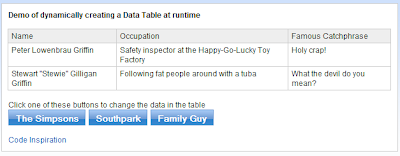
In the demo I've made, I create a Data Table control inside an empty Panel component. The panel's data binding is a sessionScope variable. The XPage has a couple of buttons that lets you change the data of the table. The buttons do a partial update on the dynamically created table.
Screenshots of demoapp:


>> Download demoapp
This "technique" can easily be used for programmatically modifying existing Data Tables at runtime as well. Take a look at the code, and get inspired.. :)
Share and enjoy!

