This only works on the web.
If you put something like this in Input Validation on a field:
@If( @ThisValue = "dontpanic" ;
@Failure( "[http://dontpanic82.blogspot.com/]" ) ;
@Success )
When the user writes "dontpanic" in a field with this input validation, and try to save the document, they will be redirected to my blog.
The only use-case I can think of at the top of my head is lookup-based login-forms.
..code to check username/password..
@If( authenticated ;
@Success ;
@Failure( "[/" + @WebDbName + "/login?OpenForm&error=wrong_username]" )
)
Another use case is maybe to limit too wide searches. A customer recently searched for *ia*, in a several CMS' and thought that the search didn't work (when I tested, the search took 3-4 minutes to complete).
If you can think of/have other ways to make use of this, please post it in the comments..
Tuesday, November 20, 2007


Monday, November 19, 2007
Timesaver - Converting several values to text
I've so far only found use for it in lookup-columns, but different people, different needs.
If want to make a pipe-separated lookup-column of values like these: subject(string), ranking(number), previous_ranking(number), posted(date), modified(date)
You can combine values of the same data-type under one @Text like this:
@Implode( subject :
@Text( ranking : previous_ranking ) :
@Text( posted : modified ) ; "|" )
Apart from a timesaver, I also find it easier on the eye, than:
@Implode( subject :
@Text( ranking ) : @Text( previous_ranking ) :
@Text( posted ) : @Text( modified ) ; "|" )
Or, even worse:
subject + "|" +
@Text( ranking ) + "|" + @Text( previous_ranking ) + "|" +
@Text( posted ) + "|" + @Text( modified )
If want to make a pipe-separated lookup-column of values like these: subject(string), ranking(number), previous_ranking(number), posted(date), modified(date)
You can combine values of the same data-type under one @Text like this:
@Implode( subject :
@Text( ranking : previous_ranking ) :
@Text( posted : modified ) ; "|" )
Apart from a timesaver, I also find it easier on the eye, than:
@Implode( subject :
@Text( ranking ) : @Text( previous_ranking ) :
@Text( posted ) : @Text( modified ) ; "|" )
Or, even worse:
subject + "|" +
@Text( ranking ) + "|" + @Text( previous_ranking ) + "|" +
@Text( posted ) + "|" + @Text( modified )
Friday, November 16, 2007
Templating: Lookups -> HTML
Update, 08.12.07: An improved, more readable technique
Inspiration, ExtJs, through Rich Waters.
I've more or less come to the conclusion that HTML in lookup-views is evil.
On one of the apps I work with, there were two access levels, reader, and editor. I used to have a column for each access, and pull HTML from the view.
<pseudocode>
col := @If( @UserRoles = "[Editor]" ; 4 ; 5 );
@Implode( @DbLookup( "" ; "" ; "(lupView)" ; key ; col ; [FailSilent] ) ; "" )
</pseudocode>
This became a headache sometimes. I'd change something in one of the columns to go with new design-desicions. Maybe it was lunch, the end of the day, or talking to a co-worker, not exactly sure, but sometimes only one column remained altered. I'd program javascript/make css for the new HTML, and think everyting is ok. Release the update. Users got JS-errors/corrupted designs/etc.
The errors wouldn't come as far as to applications in production now, as we test thouroughly before release, but it could still be a maintenance headache.
Step one to get rid of headaches:

(missing </table>)
Step two to get rid of headaches:

You're probably not going to save any time writing the transformation to HTML using templates the first time, but you'll save time in the long run. Having the template in one string instead of concatenating bits of the html-per-item on several lines also increases readability of the code.
Example of simple evolution:

Result:

>> Simple demoapp
For my access-level-problem, I either write a separate template for each access (e.g. add edit link for [Editor]),
or put @If(@UserRoles = "[Editor]" ; "" ; @Return("") ) at the top (don't do anything if not editor).
Inspiration, ExtJs, through Rich Waters.
I've more or less come to the conclusion that HTML in lookup-views is evil.
On one of the apps I work with, there were two access levels, reader, and editor. I used to have a column for each access, and pull HTML from the view.
<pseudocode>
col := @If( @UserRoles = "[Editor]" ; 4 ; 5 );
@Implode( @DbLookup( "" ; "" ; "(lupView)" ; key ; col ; [FailSilent] ) ; "" )
</pseudocode>
This became a headache sometimes. I'd change something in one of the columns to go with new design-desicions. Maybe it was lunch, the end of the day, or talking to a co-worker, not exactly sure, but sometimes only one column remained altered. I'd program javascript/make css for the new HTML, and think everyting is ok. Release the update. Users got JS-errors/corrupted designs/etc.
The errors wouldn't come as far as to applications in production now, as we test thouroughly before release, but it could still be a maintenance headache.
Step one to get rid of headaches:
Moving the presentation out of the view
Get rid of HTML-views, use simple lookup-views (value1|value2|value3) instead. Example of transformation to HTML.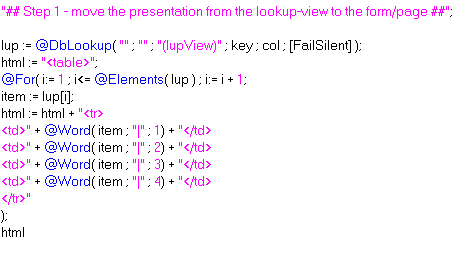
(missing </table>)
Step two to get rid of headaches:
Using template-strings
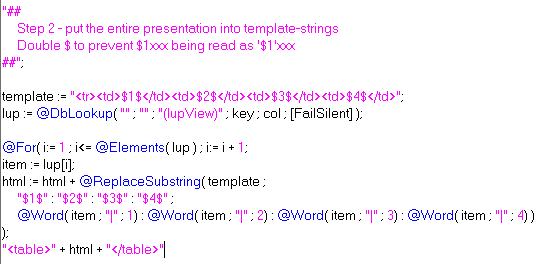
You're probably not going to save any time writing the transformation to HTML using templates the first time, but you'll save time in the long run. Having the template in one string instead of concatenating bits of the html-per-item on several lines also increases readability of the code.
Example of simple evolution:
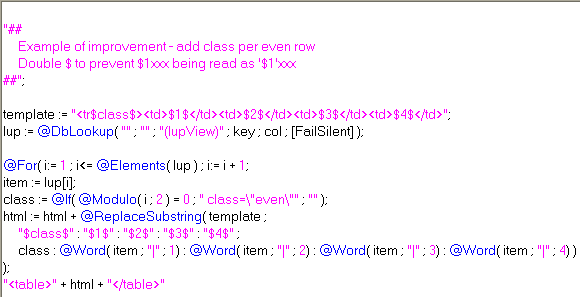
Result:
>> Simple demoapp
For my access-level-problem, I either write a separate template for each access (e.g. add edit link for [Editor]),
or put @If(@UserRoles = "[Editor]" ; "" ; @Return("") ) at the top (don't do anything if not editor).
Document generator - Discworld "characters"
I've mostly used Jakes fakenames-app for demos, but I've got tired of cleaning out design-elements to make it lean bytewise.
Run java-agent generateDiscworldCharaters to make documents. Currently set to 500 documents. No uniqueness check.
I use four arrays, first-name/title, last-name/"the Something", guild/company, address/country. Math.random() and a loop to create documents.
>> Discworld name generator
Run java-agent generateDiscworldCharaters to make documents. Currently set to 500 documents. No uniqueness check.
I use four arrays, first-name/title, last-name/"the Something", guild/company, address/country. Math.random() and a loop to create documents.
>> Discworld name generator
Saturday, November 10, 2007
Book recommendation, Code Complete
Just started reading this book:

Book description
Take a strategic approach to software construction and produce superior products with this fully updated edition of Steve McConnells critically praised and award-winning guide to software development best practices.
It deals with software development/project-management issues that I've seen at my place of work. A very interesting read.
Code Complete at Amazon
Code Complete at O'Reilly Safari (where I'm reading it)
Saturday, November 3, 2007
Templating using a NotesForm
Coding templates in an agent leads to very verbose agents/a maintenance nightmare (in my opinion). Coding them in a NotesDocument makes it hard to use them in a Design-template context.
This technique has little verbosity beyond the actual code to generate HTML, and works great in a Design Template-context. It supports modularity, as each field is a potential module. Since the templates are forms, the dynamic "modules" also work in stored documents.
You can combine Java (through LS2J), formula (through Evaluate) and LS , just like you can when you're using agents for templating web-pages. If you're a Java-guy, then you probably would need a little more code (testing field names with Regular Expression) to achieve the same.
Combine this technique with @UrlQueryString in Form Formula if you want the ability to present data in several content-types.
The technique relies on Execute, a WQO-agent and field-names following a pattern. I chose Execute because it's faster than making a testing-routine for patterns. If you're planning on putting this technique to use in real applications, I suggest you use Regular Expressions, Instr, etc. to look for valid field-names, as Execute is horrible to debug.
I have one pattern that I look for in a field-name, "wqo_actonfield_". The third token (separator = "_") is the method to be executed. The rest of the tokens are ignored to allow several fields executing the same function.
You could also have the rest of the tokens being parameters for the method being executed.
For instance field named "wqo_search_google_dontpanic" -> run a function that inserts HTML with search-results into the field.
>> Demo Application.
WQO-agent for demo:

Form, one demoBody-field:

Result, web

Form, six demoBody-fields:

Result, web (click for full size)

As always, comments are appreciated :)
This technique has little verbosity beyond the actual code to generate HTML, and works great in a Design Template-context. It supports modularity, as each field is a potential module. Since the templates are forms, the dynamic "modules" also work in stored documents.
You can combine Java (through LS2J), formula (through Evaluate) and LS , just like you can when you're using agents for templating web-pages. If you're a Java-guy, then you probably would need a little more code (testing field names with Regular Expression) to achieve the same.
Combine this technique with @UrlQueryString in Form Formula if you want the ability to present data in several content-types.
The technique relies on Execute, a WQO-agent and field-names following a pattern. I chose Execute because it's faster than making a testing-routine for patterns. If you're planning on putting this technique to use in real applications, I suggest you use Regular Expressions, Instr, etc. to look for valid field-names, as Execute is horrible to debug.
The demo
I have one pattern that I look for in a field-name, "wqo_actonfield_". The third token (separator = "_") is the method to be executed. The rest of the tokens are ignored to allow several fields executing the same function.
You could also have the rest of the tokens being parameters for the method being executed.
For instance field named "wqo_search_google_dontpanic" -> run a function that inserts HTML with search-results into the field.
>> Demo Application.
Screenshots
WQO-agent for demo:
Form, one demoBody-field:
Result, web
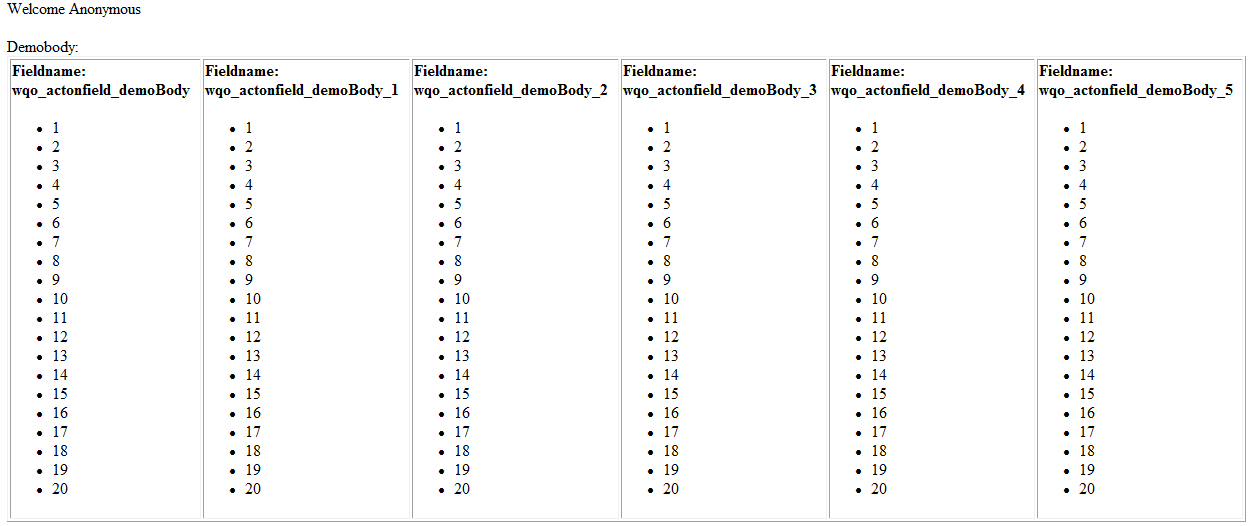
Form, six demoBody-fields:
Result, web (click for full size)
As always, comments are appreciated :)