Showing posts with label fgoto. Show all posts

Monday, August 25, 2008

Workaround: ViewRefreshFields does not trigger WQO

A form I'm working on gets a combobox (or select list, if you prefer) generated by a WebQueryOpen agent. The content of the combobox is generated on the basis of another field.

I use one combobox to select a db, then the second shows documents in the selected db.

When I select a db, I want to generate the select list with documents in the selected db. I first considered running ViewRefreshFields, but WQO-agents don't get triggered by this.

It seems that running agents with the ToolsRunMacro @Command keeps the form as it was before the running of the agent.

The workaround, then, is quite simple. Add a hidden button (style="display:none") on the form. OnClick on the button, run the agent generating HTML (and ViewRefreshFields, if you need to refresh the form). Onchange in the db-combobox, click the button.

document.getElementById('your-id-in-the-button').click()


If you've used a similar approach, and found weaknesses with it, please let me know in a comment.

Wednesday, July 2, 2008

Simple trick to add PNGs as image resource

In the Open-dialog you get when you click New Image Resource, type *.png and press enter. Then you filter the "view" so that only PNG images show. You can use this trick to add other file-types as well.

I've used this trick in other applications for years, and thought it was common knowledge. A colleague of mine wasn't aware of this the other day, so I thought I should share it with you as well.

I don't know if this works on Mac/in Linux as I'm not familiar with their file system browsers.

Wednesday, March 26, 2008

Simple function to trim JS string arrays

Update, 08.05.08:
A better trimming-function:

function trimArray( array ){
var trimmedArray = [];

var item;
for( var i = 0, len=array.length ; i < len ; i++ ){
item = array[i];

if( item !== '' ){
trimmedArray.push( item );
}
}

return trimmedArray;
}


Had a case at work where I needed to make a breadcrumb-like thingy.

The breadcrumb consisted of either two or three elements, and got it's values from form-fields. Instead of checking the fields for values, I put the values in an array, trim the empty values, and join the array with a separator.

The trimming-function:

/* Trim empty strings from JS string-Arrays */
function trimStringArray( array ){
return array.join( ',' ).replace( /,{2,}/g, ',').split( ',' );
}


Testcode for the Firebug-console.

Result (in Firebug):

Tuesday, March 25, 2008

Improved HttpRequest class - Handles request_content above 64k

For those of you that haven't heard, in Domino 7.01, IBM implemented a workaround for (HTTP POST) request-content above 64k.

I've updated the HttpRequest class, so that it handles requests above 64k automagically.

>> My testbed for the class
The test-app has a page that posts ~260k of data to an agent. This results in 4 request_content fields. The agent prints a report of the request ( [HtppRequest].printHtmlReport ).

The class (txt-file)

Let me know if there are errors.

Friday, March 14, 2008

Simple function to test if a list is empty

I needed a function to test if a list is empty today. This is of course something IBM doesn't think we developers have to test for, so it's not in the LS API.

Here is what I came up with.
Function listIsEmpty( listToTest As Variant ) As Boolean
If Not Islist( listToTest ) Then_
Error 1001, "The variable tested is not a list"

Forall item In listToTest
'If there is one or more items, the Forall-loop runs
' -> The list is not empty
listIsEmpty = False
Exit Function
End Forall

listIsEmpty = True
End Function

Wednesday, March 5, 2008

Gzipping/serving gzipped static content (JS/CSS)

Bandwidth is still a concern for a big part of the web users. To save bandwidth, the simplest job is to compress the content that "never" changes. For instance JS-frameworks.

There are a couple of approaches to this, "packing" utilities like Dean Edward's packer. This compresses the JS in such a way that it's still "compilable" in it's raw form. Another way is to gzip the file. This requires that the browser unpacks the file before it is sendt to the JS "compiler".

I prefer to use both packed and gzipped JS frameworks in production. This guide will hopefully help you serve gzipped JS-files without too much hassle.

The JS-lib I use in the accompanying demo, MooTools is 72KB "unzipped" (the version that is packed using JsMin). Gzipped, it's just shy of 20KB.

Preparing the Domino server


To enable gzipped content on the server, create a web site rule (requires restart of the HTTP-task).

Example of rule:

The above rule works like this: For all files in a subfolder named gz, the domino-server will add a HTTP-header, Content-Encoding, with the value of gzip. This tells the browser that the content it is downloading is compressed.

At Compendia, where I currently work, we've set this as a global rule, as it doesn't affect any other content.

Compressing files


To compress files on your machine, you need an application that can gzip files. I use gzip for DOS.

Download gzip for DOS:
32-bit (doesn't work on 64-bit Vista)
64-bit

Extract the downloaded utility to a folder of your choice. At work, I have it on c:\gzip.

Copy the file(s) you want to compress into the folder you extracted the gzip-utility.
Open command-line. cd into the folder you've extracted the gzipping-utility.

For the 64-bit utility: minigz64 name_of_file.js
For the 32-bit utility: gzip name_of_file.js

Be aware of that the dos application overwrites the original file by default.

Adding the files to a DB


Add the uncompressed/compressed file (New File Resource) to the DB of your choice. Rename the uncompressed file to lib\[filename].js, and the compressed to gz\[filename].js

With the aforementioned web site rule in place, browsers opening the gzipped file will get the correct HTTP-header, indicating gzipped content.

What about users that doesn't have gzip-enabled browsers/etc?


Some proxies/browsers/thin clients doesn't support/allow gzipped content. It's easy to identify if a browser supports gzipped content:

supportsGzip := ( @Contains( @GetHTTPHeader( "Accept-Encoding" ) ; "gzip" ) );


In the index-page of the simple demo-app, I compute the folder in a script-tag by the presence of Accept-Encoding: gzip header.

"<script src=\"/" + @WebDbName + "/" +
@If( supportsGzip ; "gz" ; "lib" ) + "/mootools-release-1.11.js\"></script>"


>> Download demo-app with gzip for Dos/mootools compressed/uncompressed.

PS! The index-page needs to run on a server with gzipping enabled, like in the picture at the top of this post. Either that, or you can run the browser in HTTP 1.0-mode. HTTP 1.0 doesn't have the Accept-Encoding header.

Good luck!

Tuesday, March 4, 2008

"Advanced" usage of the Print statement

I discovered this a couple of months ago, by coincidence (I actually read the documentation, instead of jumping to the example).

Punctuation characterPrint statement behavior
Semicolon or space in exprListThe next data item is printed with no spaces between it and the previous data item.
Semicolon at end of exprListThe next Print statement continues printing on the same line, with no spaces or carriage returns inserted.
Comma in exprListThe next data item is printed beginning at the next tab stop. (Tab stops are at every 14 characters.)
Comma at end of exprListThe next Print statement continues printing on the same line, beginning at the next tab stop. (Tab stops are at every 14 characters.)


In most of my previous code, when debugging, I wrote something like this:
Print "Field contents: " + doc.stringField(0) + ", " & doc.numberField(0)

Using the comma separated syntax, you can get away with:
Print "Field contents:", doc.stringField(0), doc.stringField(0)

I've started using the comma-separated syntax, when debugging, simply because it's less verbose/faster to write.

I did a little test to see how the different "methods" of using Print worked. It seems like the semicolon/comma a the end of the line doesn't work (see picture below). Either that, or I've misunderstood the documentation.

Monday, February 18, 2008

XML Nodetype Constants

Update, 04.03.08: It appears I was fooled by Prototype. The Node-interface/object is not available in IE.
..if (!window.Node) var Node = { };

if (!Node.ELEMENT_NODE) {
// DOM level 2 ECMAScript Language Binding
Object.extend(Node, {
ELEMENT_NO..


From reading JS-code in different places, it doesn't look like many people are aware that there are constants for the different node-types in a HTML/XML-document.

Most code I've come over tests the type like this:
if( xmlNode.nodeType == 1 )

Which is ok, if you remember that 1 corresponds with element-nodes. The Node-interface in DOM level 1 contains a property/constant for each of the nodetypes.

A list of the constants:
ELEMENT_NODE: 1
ATTRIBUTE_NODE: 2
TEXT_NODE: 3
CDATA_SECTION_NODE: 4
ENTITY_REFERENCE_NODE: 5
ENTITY_NODE: 6
PROCESSING_INSTRUCTION_NODE: 7
COMMENT_NODE: 8
DOCUMENT_NODE: 9
DOCUMENT_TYPE_NODE: 10
DOCUMENT_FRAGMENT_NODE: 11
NOTATION_NODE: 12

A more readable version to the previous test:
if( xmlNode.nodeType === Node.ELEMENT_NODE )

Tuesday, February 5, 2008

ReadableLookups: Global constants for forms/subforms

This technique is probably overkill on smaller applications. It's quite verbose compared to writing the values directly into fields/computed texts. Long living, ever changing applications may benefit using this technique though, maintainability-wise.

Basically, the technique is a shared, computed for display field that you put in all your forms. This field may contain the names of lookup-views, index of lookup-columns, replica-id's, filepaths to co-existing applications, et cetera.

Due to the nature of the readable lookups, there's no problem with inline comments in the field, or re-organizing the "constants".

Example of field

To extract a value from the field, you have to use quite a verbose syntax, but if the constant is used a lot of places, the added verbosity is worth it, as you only have to change the value one place, in the shared field.

Example of extraction of value from constants-field:

(name of shared field, SF_CONSTANTS)

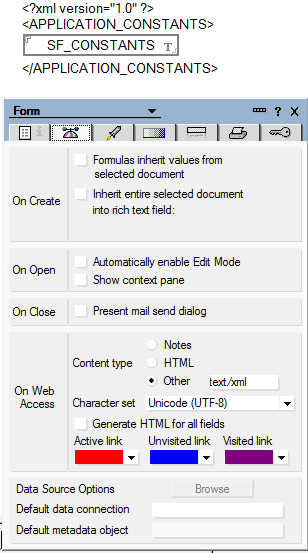
If you want the Notes/Domino constants available to Javascript/etc on the web as XML, simply put the field in a form with content-type: text/xml. Add a document-node (APPLICATION_CONSTANTS in the example below), and you have access to the constants on the web as well.

The form
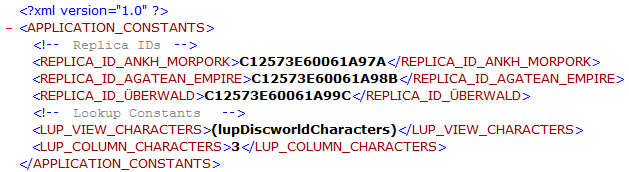
Example of output XML

Since the constants are in a field, the values are also available to LotusScript when working with documents.

Simple function to extract values in LS.

PS! Remember to put the field at the top of the form, so that it is available to all the other fields in the form

Thursday, January 31, 2008

No more coding PassThruHTML for RT-fields

Update, 04.02.08: It seems ReplaceItemValue on NotesRichtextItems is limited to dreadful 64k limit. Undocumented as far as I can tell.

When storing HTML in documents, I've always done the .RemoveItem .. CreateStyle .. PassThruHTML .. CreateItem... body.AppendStyle ..body.AppendText..

It can be simpler (WebQuerySave):
Dim session As New NotesSession
Dim doc As NotesDocument
Set doc = session.DocumentContext

Dim body As NotesRichTextItem
Set body = doc.GetFirstItem( "body" )
Call doc.ReplaceItemValue( "body", body.GetUnformattedText() )
Call doc.Save( False, False )


Where "body" is the name of you RichText-field.

The RichText-fields needs to be marked as PassThruHTML in the form. The easiest way to do this is to add a space before and after. Select space[RichText]space. Text -> Pass-Thru HTML.

This turned out to be a great day of discovery for me :D

Simple demo-db to test the difference between saving the document with above code on WQS/no WQS.

--
(Original post, Flush NotesRichTextItem on one line)

In the past, I haven't found another way to flush content in a RTI than to remove the existing, and create a new one.

I did a little testing today, and found out you can use ReplaceItemValue to flush the content:
Call [NotesDocument].ReplaceItemValue( "[RT-fieldname]", "")

If you want to replace the content, with something else from a String:
Call [NotesDocument].ReplaceItemValue( "[RT-fieldname]", newContentString)


Leaner code.. Yay!!

Wednesday, January 30, 2008

Embed multiple standalone forms on a domino form using DHTML

By standalone I mean that when you submit a form, you don't submit all the others/the main form.

I decided to make this when I read a question in Jake's latest article, How to Embed a Login Form on All Lotus Domino Pages.

The question is not directly connected to this blogpost, but somewhat.

The question:
Hi Jake,

We are getting two HTML form tag in view source of page in browser, one form tag for main form and other which is login form.

My question is, How will I handle when we are submiiting the Login form ? Will it submit the main form as well ?

Could you please help me

Regards
Ajay B Mali


The demoapp loads another form using an iframe. Using DHTML I pick the form out of the iframe and inject it at the top or bottom of the form that is open. The reason for either top or bottom is that forms can't be nested (read Jake's excellent article for more info). If you want it in a specific position on the page, CSS may help you.

The reason for iframe and not XHR (Ajax), is that XHR returns text. With the iframe, I can more or less pick what I want out of the "iframed" document, the way I would on the "main" document.

>> The demoapp (Names-form)

Tested in Opera 9, IE7 (Vista) and Firefox 2

Thursday, January 24, 2008

Serving Gzipped content - Test for browser-support

In the newest version of the CMS I'm working on/maintaining, a couple of customers got strange errors. The culprit was that for some reason or other, their browser didn't accept gzipped content.

The workaround


acceptsGzip := ( @Contains( @GetHTTPHeader( "Accept-Encoding" ) ; "gzip" ) );

{<script src="/} + @WebDbName +
@If( acceptsGzip ; "/gz/mootools.js" ; "/lib/mootools.js" ) + {"></script>}

Wednesday, January 23, 2008

A thing to be aware of when creating FT-index with LotusScript

The agent must run locally. This is achieved by [agent].RunOnServer.

This is probably public knowledge.

A thing I just discovered is that the database you're creating the index for has to contain at least one document. I stumbled onto this when working with an agent that creates a "history" database (empty on creation) from a template.

Another application copies documents into the history DB when changes are made. The history DB has a search interface, and therefore I create the the FT-index.

It's a simple workaround, create a dummy-document, create ft-index, delete dummy-document, but WHY should I have to do that?!?

Wednesday, January 16, 2008

Coping with caching of JS-libraries

Update, 17.01.08: If you want to play it safe, follow Vitors advice to me (in the comments), and use versioning on the file-names of the scriptlibs. My experiment was fun, but it's bad to put the "responsibility" of handling change in the codebase, on the customer.

At work today, a customer couldn't get the CMS I am responsible for to work properly. The reason being that I recently updated some markup and JS in the design-template for the CMS. The client had the old JS library cached in the browser. Due to the markup-change, a function in the old JS library failed, which resulted in a JS error, and things not working properly.

This got me thinking on how to avoid this in the future/let the user know what failed, and if a caching issue, how to force a refresh.

My so far best solution is to have two javascript-variables (strings). One in the markup (above all the external JS-libs), and one in an external JS-library. If the two doesn't match, inform the user.

The downside to this approach is if you have several non-static JS-libraries on one page. You can't know which one is going to be cached, so you have to add the check to all of them.


[Flash Animation. If not visible in your RSS-reader, open blogpost]


The accompanying demo application is a mess, but hopefully it's easy for you to play with. Tested in IE6/7, FF2 and Opera 9.

>> Simple demo application

Wednesday, December 12, 2007

HttpRequest-class

Fetching Post/Get parameters with an agent isn't easy in LotusScript with inbuilt tools.

I made this simple class today as a replacement for a get-only getParameter routine I used earlier. This class should handle both get- and post-requests.

My "documentation" (something new I've been trying out) of the class:


>> Class in a text-file
(the tabs are a little off in Notepad/Wordpad, but should look correct in DD)

>> Simple demoapp

Update, 01.07.2009: A small codechange to support multi-value requests. For instance from a form with checkboxes.

Update, 30.05.2008: There was a bug in the class. If you had a parameter containing "=", the parameter value would be cut off before =. The class is updated with the fix (demoapp not updated).

Update, 25.03.2008: I've updated the class so that it should handle request_content above 64k. Read more here.

Update, 13.12.2007: I updated the class with a method to print a html-report of the request, using the docToHTML-procedure in the previous post.

Update, 25.09.2008: Added functionality to fetch cookies from a request.

Saturday, December 8, 2007

Readable lookups: Lookups -> HTML with formula

Update, 20.12.07: Demo-application done.

To avoid making a monsterpage, I'll split up the different tricks you can do with the readable lookups technique.

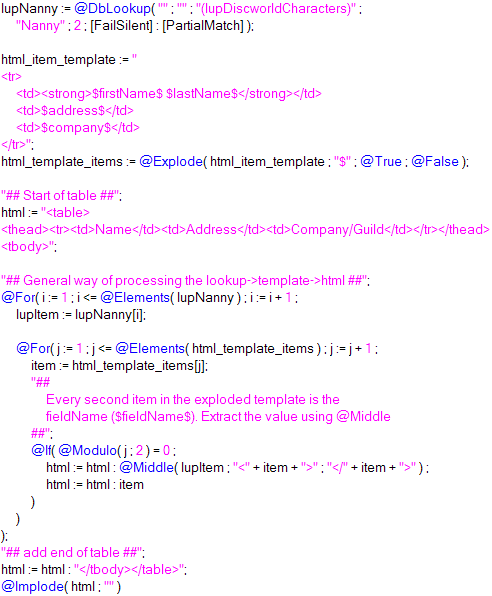
First example, generating HTML from lookups with templating, in a readable way. I'll post a demo-db when I'm done making examples.

The lookup-view


First, I create a lookup-view.

First column: firstName + " " + lastName
For real-life apps, I mostly use ComputedWhenComposed-fields with @Unique as a general lookup-field.

Second column:

The advantage in writing it this way is that all you have to do to add more data is to add the field-name to the fields-list. Another advantage is that there is less chance of typing errors, as less is written. The biggest disadvantage is performance. If you have a lot of documents (maybe 20 000++), I'd think the above way of writing the column formula would be more resource-heavy on view-indexing than if you simply concatenate strings.


Formula-templating-examples:


First, take a look at my previous, less readable technique, where i had pipe-separated lookup-data.

New, "self documenting" lookup -> HTML technique:
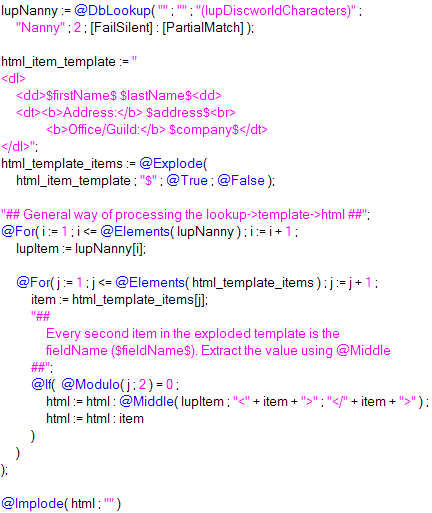
Definition lists
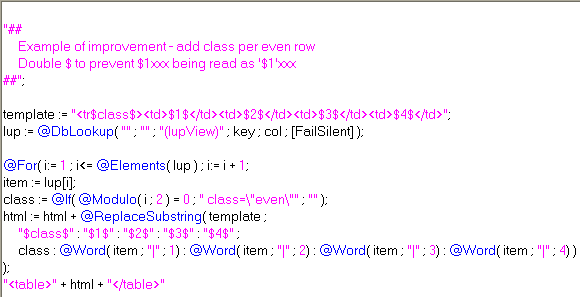
A table

>> Result of the above to examples

Thursday, November 29, 2007

Notes/Web JS to get text from aliased combobox/dialog list

Something I needed today. Thought i could share it with you. Easy to make, but sometimes one forgets that Notes supports JS.

>>Flash-demo
I forgot to refresh, so the alias doesn't show :)

The reason I didn't use "Refresh field on keyword change" is that it's awful on web (reloads the page).

The alias of the combobox/dialog list was the corresponding number to the text (One|1, etc).

>>Demo-application

In Notes, the code also works with hidden/computed fields. For computed fields, set value = @ThisValue.

For the web, you should probably set the text-field to editable, "HTML Attributes" -> "type=\"hidden\"".

In Notes, onChange fires when the field looses focus/value has changed. On the web, the event fires when you select another value.

JS-header - Common Javascript:

function textFromMultivalue( multival, valuefield ){
var f = document.forms[0];
/*if valuefield is the name of the value-field,
get field from form */
var valuefield = ( typeof valuefield == 'string' ) ?
f[valuefield] :
valuefield;
/*if multival is the name of the multival-field,
get field from form */
var multival = ( typeof multival == 'string' ) ?
f[multival] :
multival;

valuefield.value = multival.options[
multival.selectedIndex ].text;
}

onChange in multi-value field (also Common Javascript):
textFromMultivalue( this, 'name_of_textfield' );

Monday, November 19, 2007

Timesaver - Converting several values to text

I've so far only found use for it in lookup-columns, but different people, different needs.

If want to make a pipe-separated lookup-column of values like these: subject(string), ranking(number), previous_ranking(number), posted(date), modified(date)

You can combine values of the same data-type under one @Text like this:
@Implode( subject :
@Text( ranking : previous_ranking ) :
@Text( posted : modified ) ; "|" )

Apart from a timesaver, I also find it easier on the eye, than:
@Implode( subject :
@Text( ranking ) : @Text( previous_ranking ) :
@Text( posted ) : @Text( modified ) ; "|" )

Or, even worse:
subject + "|" +
@Text( ranking ) + "|" + @Text( previous_ranking ) + "|" +
@Text( posted ) + "|" + @Text( modified )

Monday, October 29, 2007

Generating HTML on WQO with Formula-agents

If you mark a RT-field Pass-Thru HTML (add a space before and after, Text -> Pass-Thru HTML), you can fill it with HTML through formula.


You are limited to ~64k of data per field, and you will have to experiment a little with the generation of the HTML-string (using an array/implode), as Domino tends to give this error-message: HTTP Web Server: Lotus Notes Exception - The formula has exceeded the maximum allowable memory usage.

The advantage with WQO compared to setting the HTML in "Default value"/using a computed text is that you can move the code out of the form (I prefer as little as possible code in the form). You can run multiple agents on WQO if you have several RT-fields you want to fill (menu, maincontent, etc).

When generating HTML, I've been using more and more Evaluates inside LS-WQO-agents. In some cases, where the generated html is less than 64k, formula-agents may be the best "tool".

>> Demo-db with different formula-agents running by @UrlQueryString/a form with two formula WQO-agents.

Tuesday, October 9, 2007

@Transform as Forall-loop

I didn't think this fit into the "Complex transforms".

To use @Transform as Forall loop, simply add a @Do inside @Transform, do whatever you want with the items, and have a return-value for @Transform (@Nothing,"", etc).

Example:

list := "Tommy|Valand" : "Ford|Prefect";

@Transform( list ; "item" ; @Do(
    html := html : "<tr><td>" :
    @Word( item ; "|" ; 1 ) : "</td><td>" :
    @Word( item ; "|" ; 2 ) : "</td></tr>";

    item
    )
);
@Implode( "<table>" : html : "</table>" ; "" )


The above example isn't good, as using @For actually results in less code:

list := "Tommy|Valand" : "Ford|Prefect";

@For( i := 1 ; i <= @Elements(list) ; i := i + 1;
    html := html : "<tr><td>" :
    @Word( list[i] ; "|" ; 1 ) : "</td><td>" :
    @Word( list[i] ; "|" ; 2 ) : "</td></tr>";
);
@Implode( "<table>" : html : "</table>" ; "" )


When concatenating large strings, you'll get better performance connecting the "snippets" in a list ( list := list : item ), than using regular string-concatenation ( string := string + item )