Thursday, December 20, 2007

Semi MVC templating

In the templating-demo, I (believe) I've used the MVC pattern for templating/transforming lookups. If anyone knowledgeable about patterns reads this, please let me know if I'm way off on this.

I'm not sure if this is similar to the technique Chris mentioned in a somewhat cryptic comment on another templating blogpost.

I use a naming convention for three kinds of fields. To do the actual transformation, I use a WebQueryOpen-agent.

Naming convention/description


lup_[label]
Model
Computed for display, allow multiple values. These fields fetches the data (using dblookup/-column). One field can be used by multiple templates.

template_[label]_[description]
Controller
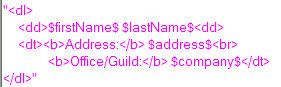
Computed for display. These fields contain the description of how the data should be transformed. The label should correspond with the label of a lookup-field. Example of template.

transformed_[label]_[description]
View
Computed for display. These fields will be filled by the result of the transformation. The label/description should correspond the label/description of a template-field.

WebQueryOpen agent
Controller
This agent contains the transformation logic/fills the transformed-fields.

Wednesday, December 19, 2007

Doing lookups on the web

Update, 20.12.07: Demo-application done.

I've finally gotten started with my templating-demo again.

One of the examples I promised was Ajaxy lookups (using the same view on the Web as in Notes). To make this happen, I thought it would be enough going to use ?OpenView&startkey=hello, but the effect of that "command" is start with documents starting with hello, then show the rest of the documents in the view.

A quick visit to my friend, google, sendt me along to an article on CodeStore.net. "Hidden" in the comments-section was my answer:

Alex Hernandez (Thu 5 May 2005 10:00) website / e-mail

Jake, I've been facing a similar problem when reading the "startkey", if the key doesn't exist, it returns the next set of documents, which is wrong. Now, if you add the "untilkey" to the url you can grab only the documents you need. This is true everytime you know how to compose the untilkey key, What I did was just adding a "_" to the end of my know startkey.

for example:
http://server/db.nsf/view?openview
&startkey=alex
&untilkey=alex_


originally If I searched for "alexh" and the key doesn't exist, it returned the rest of the docs. now with the until key, it search for docs with ket between "alexh" and "alexh_" wich returns no documents, and that's what I expected.

.::AleX::.


Thank you Alex, Jake and google!

Wednesday, December 12, 2007

HttpRequest-class

Fetching Post/Get parameters with an agent isn't easy in LotusScript with inbuilt tools.

I made this simple class today as a replacement for a get-only getParameter routine I used earlier. This class should handle both get- and post-requests.

My "documentation" (something new I've been trying out) of the class:


>> Class in a text-file
(the tabs are a little off in Notepad/Wordpad, but should look correct in DD)

>> Simple demoapp

Update, 01.07.2009: A small codechange to support multi-value requests. For instance from a form with checkboxes.

Update, 30.05.2008: There was a bug in the class. If you had a parameter containing "=", the parameter value would be cut off before =. The class is updated with the fix (demoapp not updated).

Update, 25.03.2008: I've updated the class so that it should handle request_content above 64k. Read more here.

Update, 13.12.2007: I updated the class with a method to print a html-report of the request, using the docToHTML-procedure in the previous post.

Update, 25.09.2008: Added functionality to fetch cookies from a request.

Debugging: Inspect what's being posted from a form

Sometimes I make parts of a form using PassThruHTML/hidden notes-fields. Mostly because Domino-generated HTML is hard to style (especially radio-buttons/checkboxes). This sometimes work immediately, and sometimes it takes hours to make it work. I've found it a great help to see what is being posted to the server.

There are HTTP-sniffer applications that you can inspect the request with, but I find it easier to post the form to an agent, and then print the request-content as a HTML-table.

Example of output, Jake's FakeNames database, Person-form with a couple of fields filled in.

It's also handy to "echo" get-requests when developing agents: A simple ?OpenAgent

In the demo-application for this blogpost, I've made a (javascript) action-button that rewrites the action-field in the form to point to an agent. The agent tries to print every field in NotesSession.DocumentContext.

To make this work in your applications, (hopefully,) you only have to copy the Script Library, InspectRequest, the agent inspectrequest, and the shared action, Inspect current form-values. Insert the shared action into the form you want to test.

To inspect DocumentContext in other agents, use docToHTML in the Script Library, InspectRequest. As a rare occurence, I've actually documented this function.

To get the current field-values, I trigger the equivalent of @Command( [ViewRefreshFields] ), using the Domino _doClick function.

>> Download demo application

Tuesday, December 11, 2007

IdeaJam: Let SearchView return XML, JSON

I've wanted this functionality so many times in Domino (for Ajaxy applications). Hopefully blogging about it will increase it's visibility, and get more people voting for it.

Sunday, December 9, 2007

What if....IBM collected all the best tips of the N/D "blogosphere" into a Redbook?

(Sorry for stealing your subject "pattern", Bob)

I watched a japanese TV-show some weeks ago, where they interviewed a couple of japanese bloggers that converted their blogs into book-format.

It would be great, if someone like IBM could extract all the best tips/techniques/patterns/etc. from the N/D "blogosphere" into a Redbook (along with accompanying demo-dbs) yearly.

Maybe this would help motivating even more people to spread their knowledge through blogs.