The agent must run locally. This is achieved by [agent].RunOnServer.
This is probably public knowledge.
A thing I just discovered is that the database you're creating the index for has to contain at least one document. I stumbled onto this when working with an agent that creates a "history" database (empty on creation) from a template.
Another application copies documents into the history DB when changes are made. The history DB has a search interface, and therefore I create the the FT-index.
It's a simple workaround, create a dummy-document, create ft-index, delete dummy-document, but WHY should I have to do that?!?
Wednesday, January 23, 2008


Wednesday, January 16, 2008
Coping with caching of JS-libraries
Update, 17.01.08: If you want to play it safe, follow Vitors advice to me (in the comments), and use versioning on the file-names of the scriptlibs. My experiment was fun, but it's bad to put the "responsibility" of handling change in the codebase, on the customer.
At work today, a customer couldn't get the CMS I am responsible for to work properly. The reason being that I recently updated some markup and JS in the design-template for the CMS. The client had the old JS library cached in the browser. Due to the markup-change, a function in the old JS library failed, which resulted in a JS error, and things not working properly.
This got me thinking on how to avoid this in the future/let the user know what failed, and if a caching issue, how to force a refresh.
My so far best solution is to have two javascript-variables (strings). One in the markup (above all the external JS-libs), and one in an external JS-library. If the two doesn't match, inform the user.
The downside to this approach is if you have several non-static JS-libraries on one page. You can't know which one is going to be cached, so you have to add the check to all of them.
[Flash Animation. If not visible in your RSS-reader, open blogpost]
The accompanying demo application is a mess, but hopefully it's easy for you to play with. Tested in IE6/7, FF2 and Opera 9.
>> Simple demo application
At work today, a customer couldn't get the CMS I am responsible for to work properly. The reason being that I recently updated some markup and JS in the design-template for the CMS. The client had the old JS library cached in the browser. Due to the markup-change, a function in the old JS library failed, which resulted in a JS error, and things not working properly.
This got me thinking on how to avoid this in the future/let the user know what failed, and if a caching issue, how to force a refresh.
My so far best solution is to have two javascript-variables (strings). One in the markup (above all the external JS-libs), and one in an external JS-library. If the two doesn't match, inform the user.
The downside to this approach is if you have several non-static JS-libraries on one page. You can't know which one is going to be cached, so you have to add the check to all of them.
[Flash Animation. If not visible in your RSS-reader, open blogpost]
The accompanying demo application is a mess, but hopefully it's easy for you to play with. Tested in IE6/7, FF2 and Opera 9.
>> Simple demo application
Friday, January 11, 2008
Taking visual control of Domino generated views
This is somewhat related to my previous post, as that is what sprung this idea forward, adding a class-attribute per even row/colgroup-nodes per column, dynamically.
In the downloadable demo application, I've made a $$ViewTemplateDefault-form with a JS-function that does the above, onload.
Every even row has class="even". The generated colgroup is structured like this, a <colgroup> containing <col id="column[number]"/> nodes, where [number] corresponds to the column number it represents.
To get a fix on the Domino-generated table, I've added a span around an embedded view (to easier control count). id="domino_view", class="@ViewTitle[1]".
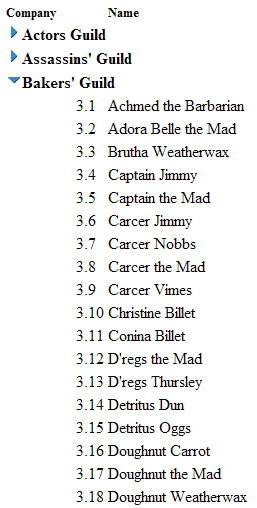
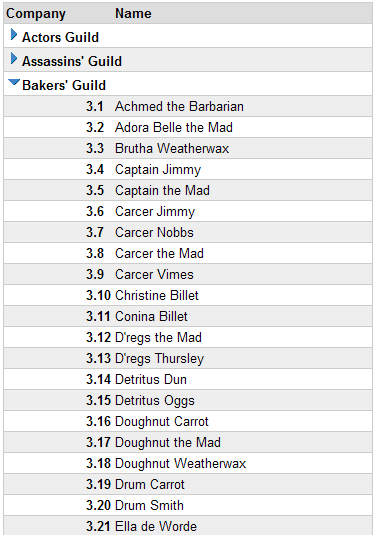
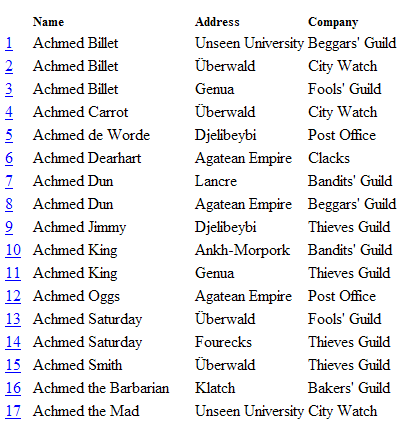
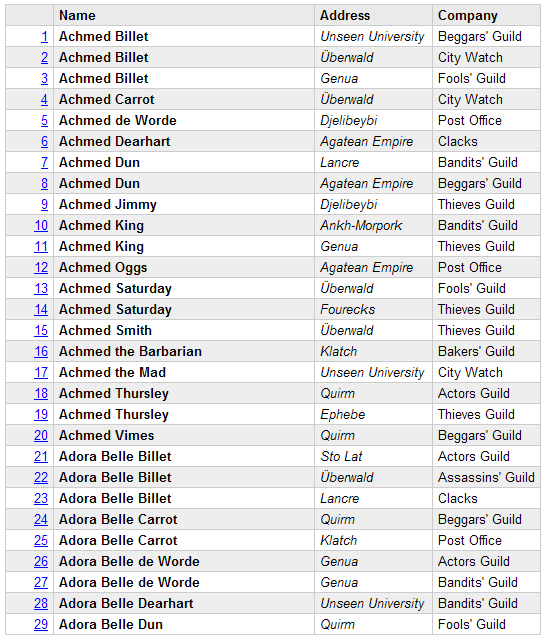
I don't know what more to say than take a look at the screenshots, and download the app, look at the code/css if you think it's something you can use.
Categorized view, no CSS
Categorized view, styled
Flat view, no CSS
Flat view, styled
>> The demo application
Tested in IE 6/7, FF2 and Opera 9.
If you discover bugs/find something strange in the demo-app/etc, let me know. Preferably through comments.. :)
In the downloadable demo application, I've made a $$ViewTemplateDefault-form with a JS-function that does the above, onload.
Every even row has class="even". The generated colgroup is structured like this, a <colgroup> containing <col id="column[number]"/> nodes, where [number] corresponds to the column number it represents.
To get a fix on the Domino-generated table, I've added a span around an embedded view (to easier control count). id="domino_view", class="@ViewTitle[1]".
I don't know what more to say than take a look at the screenshots, and download the app, look at the code/css if you think it's something you can use.
Some screenshots
Categorized view, no CSS
Categorized view, styled
Flat view, no CSS
Flat view, styled
>> The demo application
Tested in IE 6/7, FF2 and Opera 9.
If you discover bugs/find something strange in the demo-app/etc, let me know. Preferably through comments.. :)
Wednesday, January 9, 2008
CSS - Browser independent column styling
Styling on a column level can be a really powerful tool to create great looking tables. I'm no designer, so I can't show you how to create great looking columns, but I can show you the points of attack.
By using only "one point of attack" in the markup per column makes for leaner pages. By that, I mean that you could put a class on each td (first, second, etc) on every row, but that isn't really necessary, and with big tables, big html.
Internet Explorer supports a lot of styling opportunities with the colgroup element. With Firefox and Opera (not sure about Safari), you can only apply a handful of styles using this element, but on the other hand, they fully support CSS 2.1 which has some really powerful selectors.
Example of unstyled columns
I have three colgroups, one for each column. The first for column one, second for...
<colgroup id="name" />
<colgroup id="address" />
<colgroup id="guild" />
Using the CSS 1 id selector, #, it's quite easy to style columns in older IE browsers:
#name { font-weight: bold; width: 200px; background: #eee; }
#address { width: 150px; color: #888; }
#guild { font-style: italic; }
Example of styling using colgroup
To get a reference to specific columns, I use the :first-child selector, and the adjacent sibling selector.
First column in the table body (the table has id="css21"):
#css21 tbody td:first-child { font-weight: bold; width: 200px; background: #eee; }
Second column:
#css21 tbody td:first-child + td { width: 150px; color: #888; }
Third column:
#css21 tbody td:first-child + td + td { font-style: italic; }
For more columns, simply add + td per column.
Example of styling using CSS 2.1
#name { font-weight: bold; width: 200px; background: #eee; }
#css21 tbody td:first-child { font-weight: bold; width: 200px; background: #eee; }
#address { width: 150px; color: #888; }
#css21 tbody td:first-child + td { width: 150px; color: #888; }
#guild { font-style: italic; }
#css21 tbody td:first-child + td + td { font-style: italic; }
Example using both colgroup and CSS 2.1 styling
The reason for the redundancy is that IE6 seem to ignore styles that uses the above CSS 2.1 selectors, instead of ignoring the selector.
This would be ignored by IE6:
#guild, #css21 tbody td:first-child + td + td { font-style: italic; }
To remove the redundancy from the rendering engine of the browser, you could exploit the star html bug in pre IE 7 browsers. Add * html before each colgroup-styling. Then the rendering engines of IE 6 and older browsers see those styles, whereas modern browsers only see the CSS 2.1 selector styles.
Example:
/* Only visible to pre IE 7 */
* html #guild { font-style: italic; }
/* For modern browsers */
#css21 tbody td:first-child + td + td { font-style: italic; }
456 Berea Street CSS Selectors Part 1
456 Berea Street CSS Selectors Part 2
456 Berea Street CSS Selectors Part 3
Comments, critique, etc. are as always appreciated!
By using only "one point of attack" in the markup per column makes for leaner pages. By that, I mean that you could put a class on each td (first, second, etc) on every row, but that isn't really necessary, and with big tables, big html.
Internet Explorer supports a lot of styling opportunities with the colgroup element. With Firefox and Opera (not sure about Safari), you can only apply a handful of styles using this element, but on the other hand, they fully support CSS 2.1 which has some really powerful selectors.
Example of unstyled columns
Styling for < IE 7
I have three colgroups, one for each column. The first for column one, second for...
<colgroup id="name" />
<colgroup id="address" />
<colgroup id="guild" />
Using the CSS 1 id selector, #, it's quite easy to style columns in older IE browsers:
#name { font-weight: bold; width: 200px; background: #eee; }
#address { width: 150px; color: #888; }
#guild { font-style: italic; }
Example of styling using colgroup
Styling for modern browsers (FF, Opera, Safari)
To get a reference to specific columns, I use the :first-child selector, and the adjacent sibling selector.
First column in the table body (the table has id="css21"):
#css21 tbody td:first-child { font-weight: bold; width: 200px; background: #eee; }
Second column:
#css21 tbody td:first-child + td { width: 150px; color: #888; }
Third column:
#css21 tbody td:first-child + td + td { font-style: italic; }
For more columns, simply add + td per column.
Example of styling using CSS 2.1
The CSS combined
#name { font-weight: bold; width: 200px; background: #eee; }
#css21 tbody td:first-child { font-weight: bold; width: 200px; background: #eee; }
#address { width: 150px; color: #888; }
#css21 tbody td:first-child + td { width: 150px; color: #888; }
#guild { font-style: italic; }
#css21 tbody td:first-child + td + td { font-style: italic; }
Example using both colgroup and CSS 2.1 styling
The reason for the redundancy is that IE6 seem to ignore styles that uses the above CSS 2.1 selectors, instead of ignoring the selector.
This would be ignored by IE6:
#guild, #css21 tbody td:first-child + td + td { font-style: italic; }
To remove the redundancy from the rendering engine of the browser, you could exploit the star html bug in pre IE 7 browsers. Add * html before each colgroup-styling. Then the rendering engines of IE 6 and older browsers see those styles, whereas modern browsers only see the CSS 2.1 selector styles.
Example:
/* Only visible to pre IE 7 */
* html #guild { font-style: italic; }
/* For modern browsers */
#css21 tbody td:first-child + td + td { font-style: italic; }
Great CSS 2.1 information
456 Berea Street CSS Selectors Part 1
456 Berea Street CSS Selectors Part 2
456 Berea Street CSS Selectors Part 3
Comments, critique, etc. are as always appreciated!
Wednesday, January 2, 2008
2007 - A(lmost a) year in review
The blog started off with a small post, January 17. 2007.
When I started the blog, I thought I'd mostly post about Web/Domino-stuff. As the year progressed, I believe I ended up with more Notes content than Web content.
My idea-well isn't as full as it was half a year ago, but hopefully I will be able to find/create something useful to share with you in 2008.
Instead of posting my favourite posts of the year, I'll leave you with the most visited content.
On a more personal level, the highlight of 2007 was definitely my trip to South Korea.
When I started the blog, I thought I'd mostly post about Web/Domino-stuff. As the year progressed, I believe I ended up with more Notes content than Web content.
My idea-well isn't as full as it was half a year ago, but hopefully I will be able to find/create something useful to share with you in 2008.
Instead of posting my favourite posts of the year, I'll leave you with the most visited content.
Top 5 visited content of 2007
- Rant about Notes 8, Lotus/IBM
- (mis?)Using $$ReturnGeneralError as a shortcut for search
- Simplifying Evaluate
- Ajax-like live-search in the client
- Cross client (Web/Notes) validation using JavaScript
On a more personal level, the highlight of 2007 was definitely my trip to South Korea.
Thursday, December 20, 2007
Readable lookups - Demo application
The demo contains:
I've made a simple index-page. If you download the app/open http://domain.com/path/to/demo.nsf, you should see the links to the demos.
The demos aren't very exciting/useable. Take a look at the design elements for the "magic".
Link "To the frontpage" is a part of the above flash-animation
>> Download demo-application
- Implementations of the readable lookups-technique
- Examples of my "Semi-MVC" templating technique.
- A demo of in-field transformation with the formula language.
- A demo of Ajax-lookups using the "readable lookups"-view I use in the formula-demo, and a simple templating/transformation demo using DHTML.
I've made a simple index-page. If you download the app/open http://domain.com/path/to/demo.nsf, you should see the links to the demos.
The demos aren't very exciting/useable. Take a look at the design elements for the "magic".
The Ajax-demo
Link "To the frontpage" is a part of the above flash-animation
>> Download demo-application